The Best Calendar App for Freelancers (UK, 2026)
A UK freelancer usually needs a free base calendar and one specialist tool, picked by which part of the week goes wrong. Google Calendar is the free base most people already have. If clients book time with you, add a booking tool: Cal.com's free plan takes payments, and Calendly is the one clients are most likely to have used before. If your trouble is fitting client deadlines, admin and irregular hours around your calls, add a planner that schedules the work for you: Increment or Reclaim.
| App | What it does for a freelancer | Free plan | Paid price (November 2026) |
|---|---|---|---|
| Google Calendar | Base calendar, plus one booking page | Yes, with a single booking page | Payments for bookings need Google Workspace Individual |
| Cal.com | Booking pages that can take payment | Unlimited links and calendars, Stripe and PayPal payments | Teams from $12 per user a month (not needed for one person) |
| Calendly | Booking pages | One event type, one connected calendar | Standard $10 a seat a month, billed yearly, in USD |
| Reclaim | Schedules tasks and habits into Google Calendar or Outlook, with scheduling links | 1 habit, 1 scheduling link, plans 1 week ahead | Starter $10 a month billed yearly, $12 monthly |
| Increment | Plans client work, admin and standing goals around fixed commitments | A free demo, and a 14-day trial with no card | £6 a month, £48 a year or £120 once |
What a freelancer's calendar has to handle
A freelancer's calendar has to handle four kinds of time, and most calendar apps handle only the first one well:
- Fixed commitments: client calls, site visits, school runs.
- Client deadlines: work with a due date and an estimate but no set time to do it.
- Admin: invoicing, chasing payments, bookkeeping and Self Assessment. This is regular work that has to happen at some point each week or month, not at a set time.
- Bookings: clients picking a slot themselves.
A plain calendar records the first kind. A booking tool handles the fourth. The middle two are where freelancers fall behind, because a to-do list does not tell you whether this week has room for everything on it. Our guide to moving from a to-do list to a calendar covers that problem in more depth.
Google Calendar: the free base calendar
Google Calendar is free with a personal Google account, and most freelancers start with it because clients' invitations already land there. It also includes a basic booking page. On a free personal account you can create a single booking page, and you can only set it up on a computer, not in the Android or iPhone app.
The extra booking features depend on which plan you pay for, according to Google's comparison chart:
- Google One Premium (and Google AI Pro or Ultra) adds more than one appointment schedule, automatic email reminders, and checking your availability across several calendars.
- Taking payment for a booking through Stripe, and verifying bookers' email addresses, need Google Workspace Individual or a business plan. Google One does not include them.
Google Calendar does not plan your work. Deadline work has to go in by hand as events and be moved by hand when a call overruns.
Cal.com: free booking pages with payments
Cal.com is the free booking tool to choose if clients pay when they book, such as a coach, tutor or consultant selling sessions. Its free plan has unlimited booking links and unlimited connected calendars, takes payments through Stripe and PayPal, and sends email and SMS notifications. Custom notification workflows are on the paid Teams plan, at $12 per user a month (November 2026), which one person rarely needs.
Calendly: the booking page clients recognise
Calendly is the booking tool clients are most likely to have used before, but its free plan is narrow for a freelancer with more than one kind of meeting. Calendly's free plan has one event type and one connected calendar, and no automated reminders. Standard adds reminders, up to six calendar connections, and Stripe and PayPal payments, for $10 a seat a month billed yearly (November 2026). If you want a discovery call and a paid session as separate options, the free plan will not do it, and Cal.com's free plan will.
Increment: for fitting client work around fixed commitments
Increment is a calendar that places your tasks and standing goals into the gaps between fixed events, so a freelancer can see whether this fortnight's client work actually fits. You enter calls as events and client work as tasks, each with a duration and, optionally, a deadline and an urgency from 1 to 5. The scheduler places the work as blocks on a week grid, two weeks ahead, with tasks that have deadlines placed first. A task that cannot be finished before its deadline is still placed, and it is marked at risk with the number of minutes that will not fit in time. That tells you on Monday that Thursday's deadline is in trouble, while you can still move a call or tell the client.
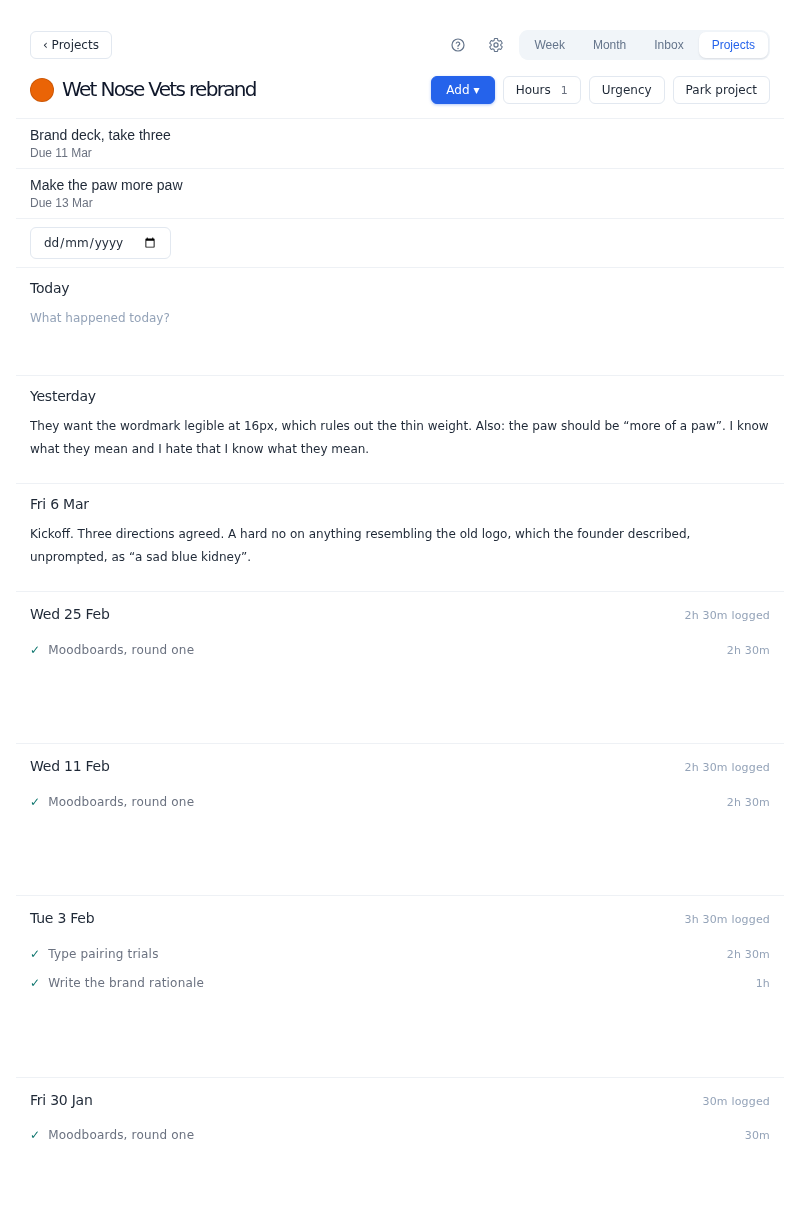
Increment's projects fit a freelancer with several clients. Each client can be a project with its own colour, a page listing its outstanding work, and a dated journal for notes. Folders group projects (for example "Retainers" and "One-off jobs") and set rules once for everything in them: which hours their work may use, and the urgency new tasks start at.
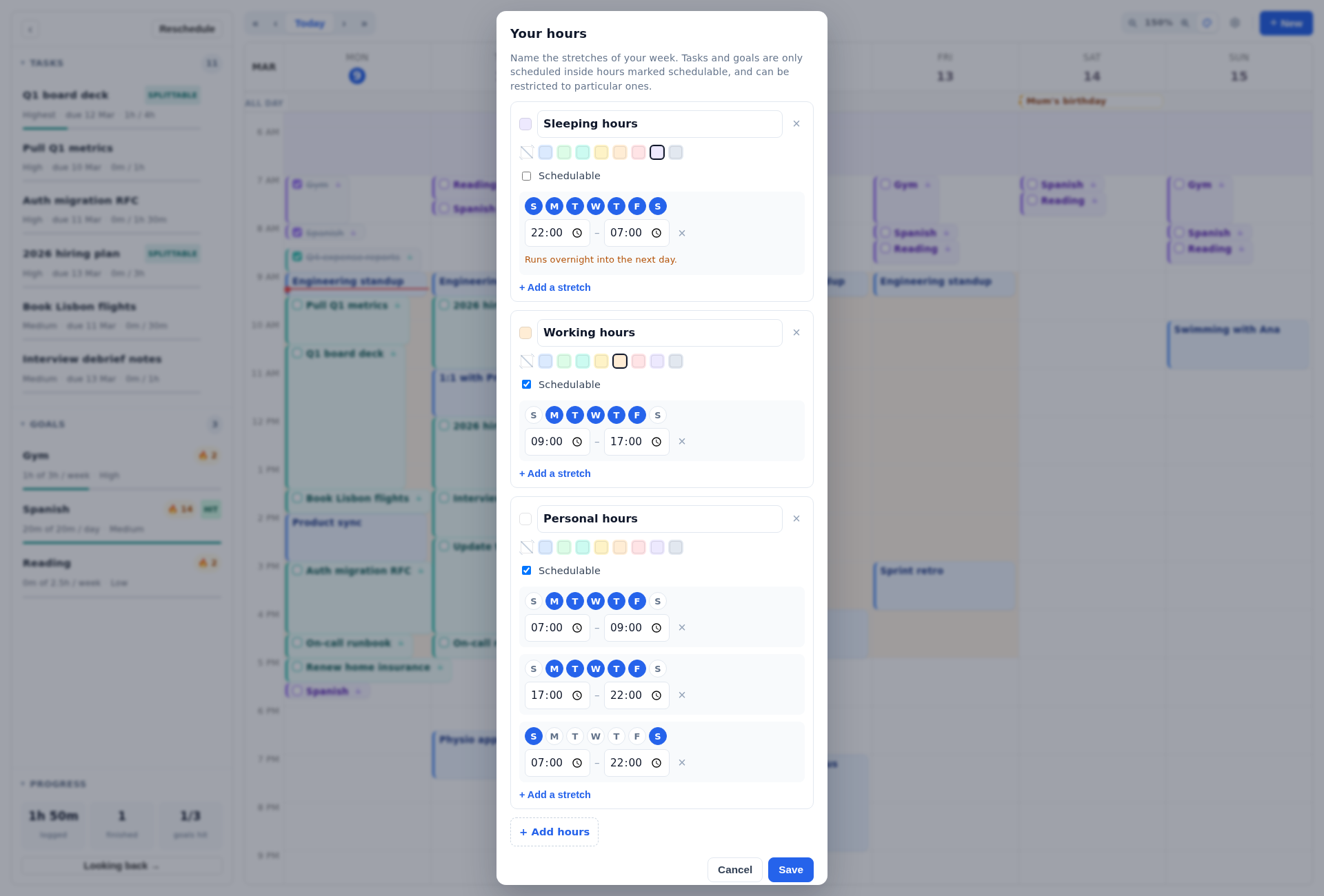
Increment's hours handle irregular working patterns. You can define any number of named sets of hours, each with as many stretches of the week as you need. Examples are "Client work" on Tuesday to Thursday mornings plus two evenings, or "Second job" on Saturdays. A stretch that ends before it starts runs overnight. Any task, project or folder can be limited to particular sets, so a project for a client who only answers questions in office hours never gets scheduled at 21:00.
Increment schedules time for admin as repeated tasks: jobs that automatically get "re-added" to your to-do list.
Once you tick blocks off, Increment's Looking back page shows where your time went, by day and by project. That is useful for checking how many hours a fixed-fee job really took. Time is logged by ticking off blocks or by entering minutes.
If clients book time with you, keep a booking tool alongside Increment. Bookings from Cal.com, Calendly or Google's booking page land in Google Calendar, and Increment reads that calendar through its secret iCal address and treats those times as busy. Outlook connects by signing in. On a phone, Increment installs from the browser and works offline. You can try it in the free demo with no sign-up, then take the 14-day trial with no card.
Increment costs £6 a month, £48 a year or £120 once for Lifetime (November 2026). Every plan has every feature, with no caps on projects, repeating tasks, goals or sets of hours.
Reclaim: auto-scheduling inside Google Calendar or Outlook
Reclaim is the alternative to choose if you want scheduled work to appear directly in Google Calendar or Outlook and want booking links in the same tool. Reclaim's pricing page lists Google Calendar and Outlook support on every plan, including the free Lite plan. According to Reclaim's help centre, Lite allows:
- 1 habit;
- 1 personal scheduling link;
- up to 2 connected calendars;
- scheduling 1 week ahead.
A freelancer who wants separate standing time for admin, business development and a personal habit runs into the one-habit limit on Lite. Starter removes the habit limit, gives three scheduling links and schedules eight weeks ahead, for $10 a month billed yearly or $12 monthly (November 2026). The full side-by-side is in Increment vs Reclaim.
Motion, Sunsama, Akiflow and other AI calendars
Motion, Sunsama, Akiflow, Morgen and FlowSavvy also schedule tasks into a calendar. They are compared on price and scheduling features in The Best AI Calendar in 2026.
How to set up a freelance week in any calendar
A freelance calendar works best when fixed dates, client work and admin go in as different kinds of item. Whichever app you use:
- Add the fixed dates first. Add client calls, regular commitments and UK bank holidays. Add the HMRC Self Assessment dates too: the online return and any tax owed are due by 31 January (31 January 2027 for the 2025–26 tax year), and the second payment on account is due by 31 July.
- Enter client work with a duration estimate and a deadline, "Logo concepts, 6 hours, due Friday" can be checked against the week.
- Give admin a weekly allowance. Invoicing and payment-chasing are easier to keep up with as a fixed amount of time each week than as an occasional emergency.
- Write down your working hours, even if they are irregular. Otherwise a scheduler, or you, will fill evenings you meant to keep free.
In Increment, a task such as "Prepare tax return" can use the 31 January event itself as its deadline. Step 3 is a repeated task, and step 4 is a set of hours.
Which calendar app should a freelancer choose?
The right calendar app for a freelancer depends on which kind of time causes the trouble:
- Clients book and pay for sessions, and your days are mostly appointments. Use Google Calendar with Cal.com's free plan.
- Clients book occasional calls, and you only need one meeting type. Google Calendar's free booking page or Calendly's free plan is enough.
- Several clients, deadlines, irregular hours, and admin that keeps slipping. Increment is built for this. It costs less than most paid auto-schedulers. Pair it with a booking tool if clients book you.
- You want planned work to show up as events in Google Calendar or Outlook, with booking links in the same app. Reclaim does that. Expect to need Starter if you want more than one habit.
Questions
What is the best calendar app for freelancers?
Usually a free base calendar such as Google Calendar plus one specialist tool. Add a booking tool like Cal.com or Calendly if clients book you, or a planner like Increment or Reclaim if fitting deadlines, admin and irregular hours is the problem.
What is the best free booking page for freelancers?
Cal.com's free plan has unlimited booking links and connected calendars, and takes payments through Stripe and PayPal. Calendly's free plan has only one event type and one connected calendar, and Google Calendar's free plan gives a single booking page.
Can Google Calendar take payments for bookings?
Not on a free account. Taking payment through Stripe for a booking needs Google Workspace Individual or a business plan, and Google One does not include it.
How do I fit client deadlines and admin into my calendar?
Enter client work with a duration estimate and a deadline rather than a fixed time, and give admin a weekly allowance. Increment does this with tasks and goals, and flags a task as at risk if it cannot be finished before its deadline.
How much does Increment cost?
£6 a month, £48 a year or £120 once, with every feature on every plan. There is a free demo with no sign-up and a 14-day trial with no card.
Tell the free demo one piece of client work you need to finish this week and how long it will take, and watch Increment fit it around a week of calls.
Try the demo