Increment vs Reclaim: How Each One Schedules Your Week (2026)
Reclaim and Increment solve different problems. Reclaim runs on top of Google Calendar or Outlook. It is built for people whose weeks are full of meetings: it protects focus time and routines, books meetings through scheduling links, and offers a free plan. Since Reclaim 2.0, it no longer gives each task its own block on the calendar. Increment is a separate calendar for one person. It places every task and goal as its own block before its deadline, and it only replans when you ask. If your week is mostly meetings with other people, choose Reclaim. If your week is mostly a to-do list with deadlines that has to fit around fixed commitments, choose Increment.
For a wider comparison that includes Motion, Morgen, Sunsama and others, see The Best AI Calendar in 2026. This page compares only these two.
Increment vs Reclaim at a glance
| Reclaim | Increment | |
|---|---|---|
| What it is | A layer over your Google or Outlook calendar | A calendar of its own that runs in the browser |
| Calendars it works with | Google Calendar and Outlook (Reclaim 2.0 FAQ) | Reads Outlook by sign-in; Google, iCloud and others by calendar link or .ics file |
| How tasks get time | Suggested inside your Focus Time blocks | Each task is placed as its own block before its deadline |
| Routines | Habits: a time window with an ideal time | Goals: a number of sessions per day, week or month |
| When the plan changes | Agents move flexible events as conflicts come up | Only when you press Reschedule or make certain edits |
| AI | AI assistant with chat and natural-language requests | None; the scheduler is fixed rules |
| Meetings and teams | Scheduling links, Smart Meetings, team plans | None; one person's week only |
| How far ahead it plans | 1 week (Lite) to 12 weeks (Business) | 14 days |
| On a phone | Home-screen web app; no native app | Installable web app; no native app |
| Free option | Lite plan, free permanently | Free demo; no free plan |
| Paid from (October 2026) | $10 per seat a month, billed yearly | £4 a month, billed yearly (£48) |
How Reclaim and Increment schedule tasks
Reclaim 2.0 does not put tasks on your calendar as blocks of their own. Increment does. Reclaim's guide to moving from 1.0 to 2.0 says that "Tasks no longer automatically schedule dedicated task time on your calendar" and that Reclaim suggests tasks during your open Focus Time instead (Reclaim help). Anyone who signed up after May 2026 is already on 2.0 (Reclaim 2.0 FAQ).
In Reclaim, you protect blocks of Focus Time against a weekly target in hours, with a minimum and maximum for each day (Focus Time Agent). Tasks can come from Reclaim's own list or from Asana, Todoist, Google Tasks, ClickUp or Linear. When you are in a Focus block, Reclaim recommends tasks in two groups: "Relevant Now" and "At Risk". It ranks them using due dates, priority, your current event and the task's details (Tasks overview). The same article says Reclaim's chat assistant can also create work blocks for tasks when you ask. In short, Reclaim keeps the time free and then helps you choose what to do with it.
In Increment, every task needs a duration, and the scheduler places it as a teal block in the earliest free time that can hold it. The order is set by priority: how close the deadline is counts for 60%, and your 1–5 urgency counts for 40%. A task with no deadline is ordered by urgency alone. Other settings change where a task can go:
- Can split is on by default, with a Smallest piece of 30 minutes. A task that cannot split waits for a gap big enough for all of it.
- Earliest start keeps a task off the calendar before a given date.
- Depends on makes sure other tasks are scheduled first.
- Hours limits a task to, say, working hours.
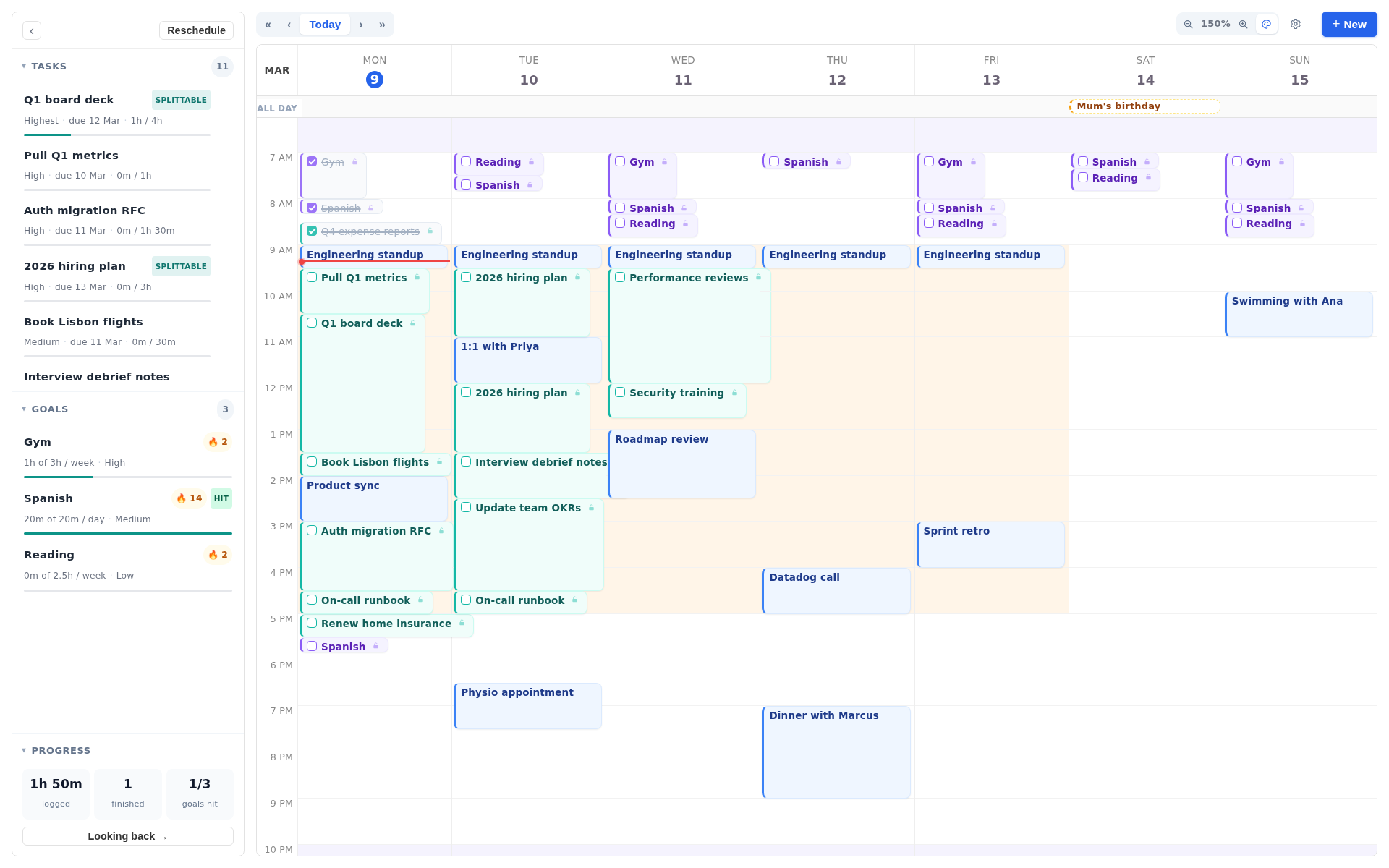
If a task cannot fit before its deadline, Increment still places it and labels it at risk, with the number of minutes that would not fit before the deadline. Work never lands on top of an event. Anything that does not fit in the planning window goes after it.
The practical difference: in Reclaim you choose the task once the focus time arrives. In Increment you can see on Tuesday that Thursday's report is booked for Wednesday afternoon, or that it will not fit.
Reclaim Habits vs Increment goals
Reclaim Habits and Increment goals both keep time for recurring things such as exercise or practice, but they are set up differently.
A Reclaim Habit has a window and a preferred time, for example lunch between 11:30 and 14:00, "ideally around noon". It has an ideal length and a shorter minimum it can shrink to on a busy day. A Habit starts as free so that other people can still book over it, and it switches to busy when the slot becomes one of the last realistic options. When space runs out, Reclaim can move the Habit, shorten it, remove that occurrence, or leave it as a conflict. Dragging a Habit by hand locks that occurrence (Habit Agent overview). Habits have priorities from Critical (P1) to Low (P4), and higher-priority items can take time from lower-priority flexible events (Priorities overview).
An Increment goal is a number of sessions of a set length per day, week or month. The default is 3 sessions of 60 minutes a week. Goals fill the time left after events and tasks, and each goal's sessions are spread across different days. When free time is short, it is shared out by each goal's 1–5 priority, and each goal stops once it reaches its target. Shortest session (15 minutes by default) sets the smallest gap a goal will use. A goal has no preferred time of day, but you can limit it to certain Hours, such as weekday evenings.
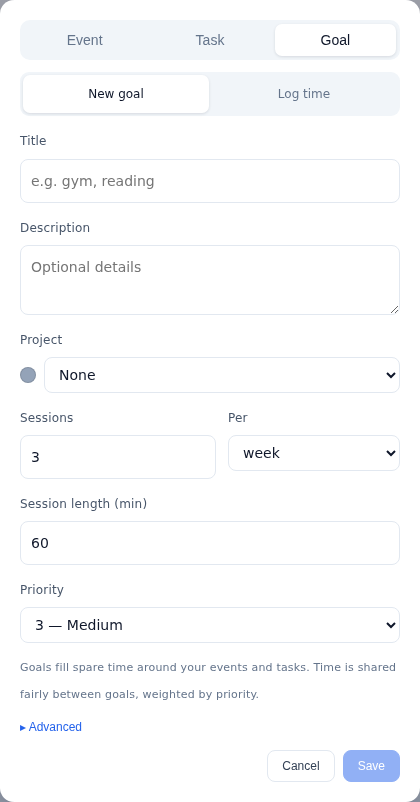
Reclaim suits routines that belong at a particular time of day. Increment suits targets like "three runs a week, whenever they fit".
Which calendars Reclaim and Increment work with
Reclaim has full support for Google Calendar and Outlook only. Its help centre says iCloud and other calendars must be imported into Google or Outlook first, and that changes can then take hours or days to come through (Reclaim help). Reclaim describes its Outlook connection as a real-time two-way sync (Reclaim Outlook integration). Reclaim's events appear in your own calendar, so you see them in whichever calendar app you already use.
Increment works the other way round. It reads other calendars and never writes to them:
- Microsoft Outlook connects by signing in, with read-only access.
- Google Calendar is added through its secret iCal address. Signing in with Google is not available. How to find your Google Calendar iCal link shows where that address is.
- Any
.icsorwebcal://link can be subscribed to directly, including an iCloud calendar or a university timetable. See Subscribe to a calendar by link. - An
.icsfile can be imported once, without an account.
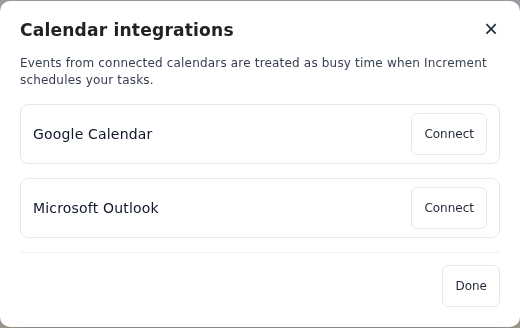
Every outside calendar has a separate Counts as busy switch, so you can show a colleague's calendar without it blocking your own work. Increment's planned blocks do not appear in Google or Outlook unless you publish a shared calendar link and subscribe to it there. Even then, only pinned and completed work is included, never blocks the scheduler placed that you have not pinned. Google Workspace administrators can turn off the secret iCal address, which would stop a work Google calendar coming into Increment by link.
If your calendar is a Google Workspace or Microsoft 365 account and you want the plan inside it, Reclaim fits better. If your fixed commitments are spread across iCloud, a timetable feed and a work Outlook, Increment can read all of them directly.
When each one changes your plan
Reclaim's Agents move flexible events by themselves as conflicts come up. Increment leaves your week alone until you ask it to replan. When a meeting lands on a Reclaim Focus block or Habit, Reclaim moves the block to another open slot (Focus Time Agent). Reclaim 2.0 also has Preview Mode, which stages changes so you can review them before they apply (Reclaim 2.0 FAQ).
Increment replans when you press Reschedule. A few edits also replan on their own: creating or moving a busy event, dropping a block you dragged, and putting a project back in the plan. When new events arrive from an outside calendar, they change which time is busy but do not move the plan. Blocks you have dragged or double-clicked are pinned, and blocks you have completed stay where they are when you reschedule. The scheduler plans 14 days ahead.
Automatic moving keeps the calendar up to date without you doing anything. Replanning on request means the plan you looked at this morning is still the plan this afternoon. Which is better depends on whether you want the tool to react for you or to wait until you say so. Why manual time blocking falls apart covers the case for automating the placement itself.
AI and natural language
Reclaim 2.0 has an AI assistant. You can type requests such as "Find 30 minutes to meet with Bob this week", and you can reach Reclaim from ChatGPT, Claude, Copilot and Gemini through its MCP server (Reclaim 2.0 FAQ). Tasks can be created by describing them in chat (Tasks overview).
Increment has no AI and no natural-language input. Every field is a form control, and the scheduler is fixed rules, so the same inputs always give the same week. The only guessing is a project suggestion, which comes from the words in your own items and is never filled in without your say-so. If you want to manage your calendar by typing requests, Reclaim does that and Increment does not.
Meetings, scheduling links and teams
Reclaim handles meetings with other people. Increment does not. Reclaim's plans include Scheduling Links, Smart Meetings for recurring meetings, Calendar Sync between calendars, and team features such as a team out-of-office calendar on Business (Reclaim pricing). Lite and Starter plans allow up to 3 Smart Meeting attendees without a paid seat. Beyond that, Starter and Business add attendee packs.
Increment plans one person's week. It has no booking links, no meeting scheduling, and no shared projects. The nearest feature is Share a calendar, a read-only link that shows other people your busy times. If you book client calls or coordinate a team's calendars, Reclaim is the right tool for that part of your work.
Increment and Reclaim on a phone
Neither Reclaim nor Increment has a native iOS or Android app. Reclaim says it "doesn't have native apps for iOS or Android". It suggests adding the web app to your home screen, or editing Reclaim's events in the Google Calendar app (Reclaim help). Because Reclaim's events are in your Google or Outlook calendar, you see them in that calendar app.
Increment installs as a web app with its own phone layout: tabs for Calendar, Inbox and Projects, and one day at a time. It works offline (how to install Increment). Increment has no notifications or reminders, so nothing tells you a block is about to start.
Increment vs Reclaim pricing (October 2026)
Reclaim has a permanent free plan and Increment does not. Reclaim charges per seat in US dollars. Increment charges one price in pounds, and every plan includes every feature.
| Plan | Price (October 2026) | Main limits |
|---|---|---|
| Reclaim Lite | Free | 5 Agents, 1-week scheduling range, 1 scheduling link, 2 connected calendars, limited integrations |
| Reclaim Starter | $12 per seat a month, or $10 billed yearly | 10 Agents per seat, 8-week range, 3 scheduling links, up to 10 seats |
| Reclaim Business | $18 per seat a month, or $15 billed yearly | 100 Agents per seat, 12-week range, unlimited links, up to 100 seats |
| Reclaim Enterprise | $22 per seat a month, yearly only | Over 100 seats, SSO and SCIM |
| Increment Monthly | £6 a month | All features |
| Increment Yearly | £48 a year (£4 a month) | All features |
| Increment Lifetime | £120 once | All features and future updates |
Reclaim figures are from Reclaim's pricing page. Reclaim's Lite plan connects Google Tasks, Slack, Zoom and Google Meet. Todoist, Asana, ClickUp, Jira and Linear need a paid plan.
Trials: Every new Reclaim account gets a 14-day trial and then moves to Lite. If you are using more than Lite allows when the trial ends, you get a 28-day overage period (Reclaim help). Increment's 14-day trial includes everything and needs an email address, not a card. Increment's interactive demo asks for nothing.
Students: Reclaim gives students, educators and faculty 50% off for 12 months (Reclaim pricing). Increment gives students a 30% discount code on Yearly or Lifetime: email [email protected] from an institutional address.
If you want to pay nothing at all, Reclaim Lite is the only free option of the two, though its scheduling range is one week. For one person over several years, Increment's £120 lifetime plan costs less than three years of Reclaim Starter at $120 a year.
Who should choose Reclaim, and who should choose Increment
Choose Reclaim if:
- your calendar is Google Workspace or Microsoft 365, and you want everything to stay there;
- your week is mostly meetings, and you need focus time and routines defended automatically;
- you book meetings with other people or work on a team;
- you want a free plan, or want to manage your calendar by typing requests;
- your tasks are in Asana, Jira, ClickUp, Todoist or Linear.
Choose Increment if:
- you have more tasks with deadlines than obvious time to do them in, and want each one given its own time before it is due;
- you want to see which tasks are at risk of missing their deadlines before it is too late;
- you want the week to stay as it is until you replan it;
- your fixed commitments come from iCloud, a timetable feed or a mix of calendars that Reclaim cannot read directly;
- you plan only your own week and would rather pay once than subscribe.
Questions
What is the difference between Increment and Reclaim?
Reclaim runs on top of Google Calendar or Outlook and is built for meeting-heavy weeks, protecting focus time and routines. Increment is a separate calendar for one person that places every task and goal as its own block before its deadline.
Does Reclaim schedule tasks as blocks on the calendar?
Not since Reclaim 2.0. Tasks no longer automatically get dedicated time on your calendar; Reclaim suggests tasks during your open Focus Time instead. Increment still places each task as its own block.
Does Increment have AI?
No. Increment has no AI or natural-language input, and its scheduler is fixed rules, so the same inputs always give the same week. Reclaim 2.0 has an AI assistant you can type requests to.
Is Reclaim free?
Yes, Reclaim has a permanent free Lite plan, with a 1-week scheduling range. Increment has no free plan, only a free interactive demo, and paid plans start at £4 a month billed yearly.
Which calendars do Reclaim and Increment work with?
Reclaim fully supports Google Calendar and Outlook only. Increment reads Outlook by sign-in, and Google, iCloud and others by calendar link or .ics file, but never writes to them.
Do Reclaim and Increment have phone apps?
Neither has a native iOS or Android app. Both work as web apps you can add to your home screen.
Try Increment's free demo to see your tasks placed as their own blocks before their deadlines, then press Reschedule to watch the week replan.
Try the demo