Increment vs FlowSavvy: Goals, Projects, Hours and Price Compared (2026)
FlowSavvy's free plan is limited in the places that make an auto-scheduler useful. You get 3 repeating tasks, 1 set of scheduling hours and 5 task lists, with no priority levels and no dependencies. Most people who use it properly end up on Pro, which costs $14 a month, or $10 a month billed yearly (October 2026, FlowSavvy pricing). Increment costs £6 a month, £48 a year or £120 once (October 2026), and every plan has everything with no caps. Increment also has two things FlowSavvy lacks: goals, as their own kind of item, and projects grouped into folders that set scheduling rules for all the work inside them.
FlowSavvy is still the better choice for some people. It has native iOS and Android apps, push notifications and a free plan that never expires, and Increment has none of these.
Increment vs FlowSavvy at a glance
Prices and limits were checked in October 2026 on FlowSavvy's pricing page and its help centre.
| FlowSavvy Free | FlowSavvy Pro | Increment (every plan) | |
|---|---|---|---|
| Price | Free | $14/month, or $10/month billed yearly | £6/month, £48/year, or £120 once |
| Goals ("3 gym sessions a week") | No goal type; habits are repeating tasks | No goal type; habits are repeating tasks | Yes, any number |
| Repeating tasks | 3 | Unlimited | Unlimited |
| Sets of scheduling hours | 1 | Unlimited | Unlimited |
| Grouping work | 5 task lists | Unlimited task lists | Unlimited projects, inside unlimited nested folders. Each with a workspace for notes. |
| Rules set per group | Default hours per list | Default hours per list | Hours and starting urgency per project or folder |
| Priority | Due date only | Do ASAP, High, Normal, Low | Deadline plus 1–5 urgency |
| Dependencies | No | Yes (not on repeating tasks) | Yes |
| Planning window | 2 weeks | 8 weeks | 2 weeks |
| Time review by project and goal | Not described | Not described | Analytics on time spent in "Looking back", with streaks |
| Phone apps | iOS and Android | iOS and Android | Installable web app |
| Push notifications | Yes | Yes | No |
| Free option | Permanent free plan | 7-day trial | Free demo; 14-day trial, no card |
Both apps schedule with an algorithm that weighs deadlines, durations and your free time. Both also replan as you make changes, and each has a button that rebuilds the plan: Recalculate in FlowSavvy, Reschedule in Increment.
What FlowSavvy's free plan holds back
FlowSavvy's free plan caps the features that most weeks need. Its pricing page lists these limits (October 2026):
- 3 repeating auto-scheduled tasks. A weekly report, revision for one module and a gym habit use all three.
- 1 set of scheduling hours. Every task competes for the same hours, so work can't be kept to working hours while personal tasks go in evenings and weekends.
- No priority levels. "Tasks are prioritized by due date on the free plan."
- No dependency chains, so you can't make one task wait for another.
- 5 task lists and 30 days of task history.
- No syncing of FlowSavvy's tasks out to Google, Outlook or iCloud. That is a Pro feature.
Pro removes each of these limits, and it is the plan worth comparing with Increment. Increment has no free plan, and none of these caps on any of its plans.
Goals: Increment schedules habits as goals, FlowSavvy as repeating tasks
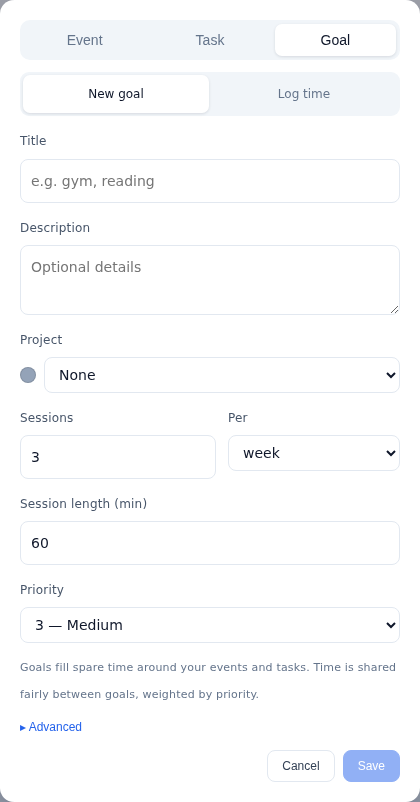
Increment has goals, a kind of item for standing intentions such as "gym three times a week" or "four hours of reading a week". FlowSavvy has nothing equivalent. In Increment, you set a goal as a number of sessions of a given length per day, week or month. The default is 3 sessions of 60 minutes a week. The scheduler then:
- spreads the sessions across different days rather than placing them in one sitting;
- fits them into the time left after your events and tasks;
- stops once the target is reached;
- when time is short, gives each goal a share weighted by its 1–5 priority;
- skips any gap shorter than the goal's Shortest session (15 minutes by default).
FlowSavvy treats habits as repeating tasks. Its own article on habits says "You can set up recurring tasks in FlowSavvy, and FlowSavvy will automatically plan them into your week." In FlowSavvy, repeat rules apply to the due date, so each occurrence is a task that has to be done by a set day. That suits a weekly report. It fits "some time this each week" less well. On the free plan, each habit also uses one of the 3 repeating-task slots.
Increment also lets you track how you are doing against each of your goals. Pressing a goal's ring logs a session. Over time, you can review your progress in Looking back.
Projects and folders vs FlowSavvy's task lists
Increment files work into projects, and projects into folders. A project or folder allows users to set rules once for everything inside it: which hours its work may use, and the urgency new tasks start at. "Uni work only on weekdays 9–5" is set once on a folder, not on each task.
FlowSavvy groups tasks into lists. A FlowSavvy list has a colour, default scheduling hours and a calendar its tasks sync to, and each task can override the list's hours. Lists don't nest and can't be grouped. The free plan allows 5 lists.
Increment's projects also do more than hold tasks:
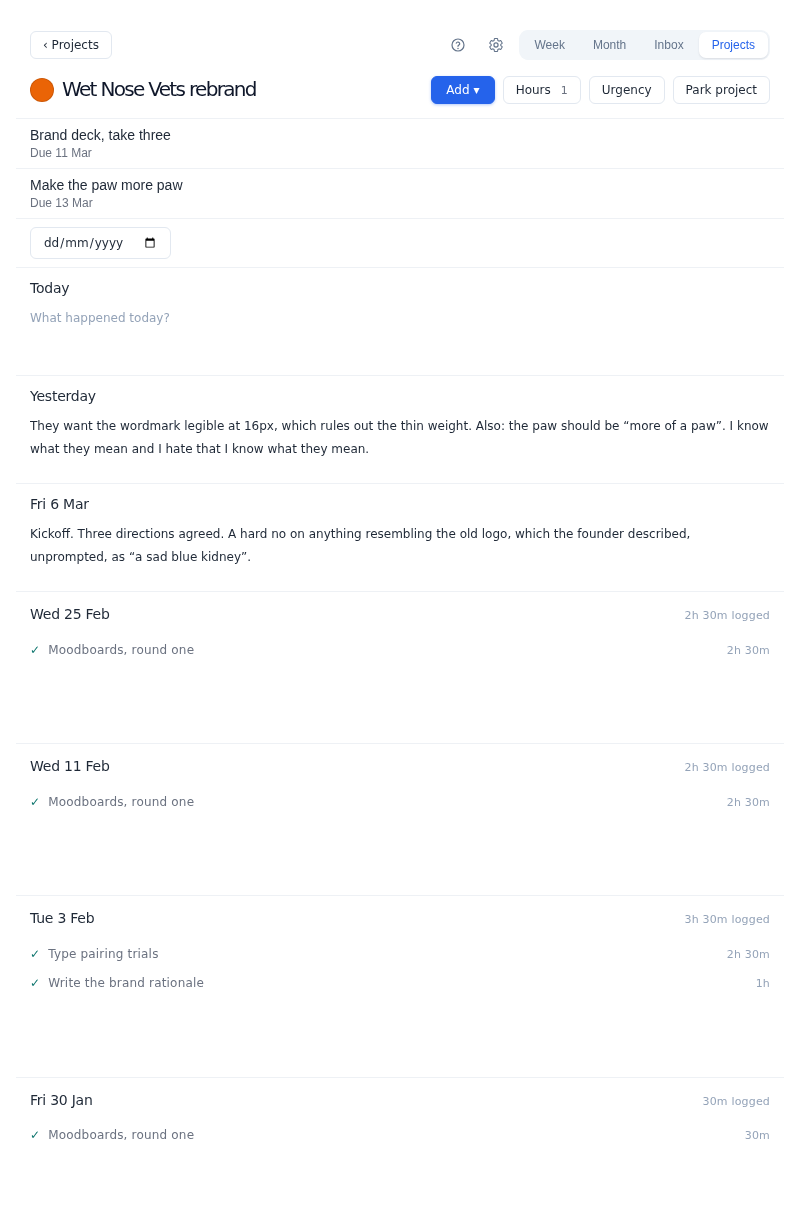
- Each project has its own page, a colour, and a dated journal that shows finished work under each day, with the time it took.
- Park project keeps a project's work but stops it being scheduled, and a folder can Park everything beneath it.
- Looking back shows where your time went, by project or grouped by folder, and any figure can be narrowed to one project.
Custom hours: unlimited in Increment, one set on FlowSavvy Free
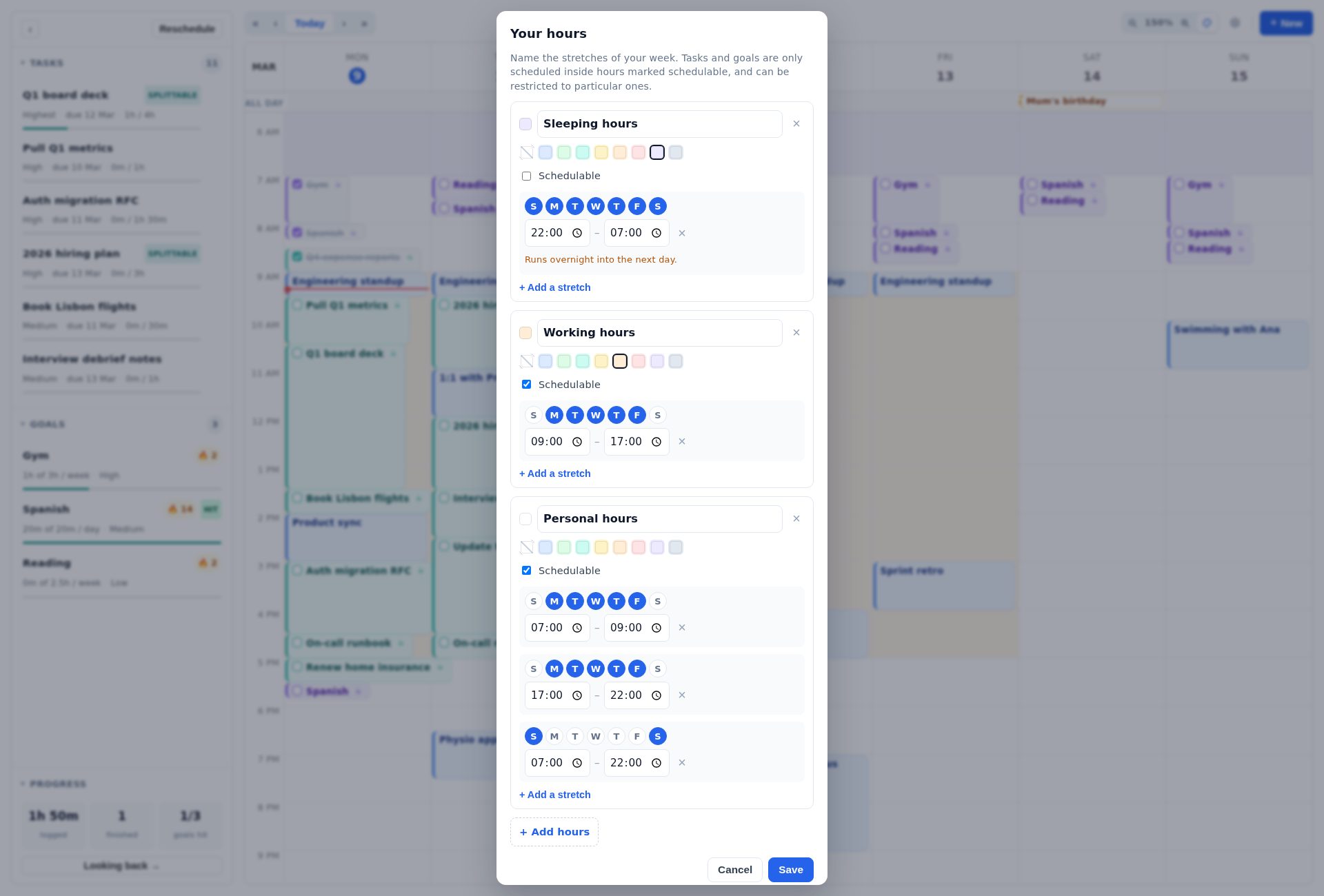
Increment lets you define any number of named sets of hours, such as working, personal, study or a second job. Each set can hold several stretches of the week, including overnight ones, and has a switch that says whether work can be planned in it. A new calendar starts with three sets: Sleeping, Working and Personal hours. Any task, goal, project or folder can be limited to particular sets of hours.
FlowSavvy calls these scheduling hours. The free plan has 1 set and Pro has unlimited "scheduling hours profiles" (pricing, October 2026). On Pro, FlowSavvy's hours do the same job as Increment's, apart from the folder rules described above.
Moving blocks by hand
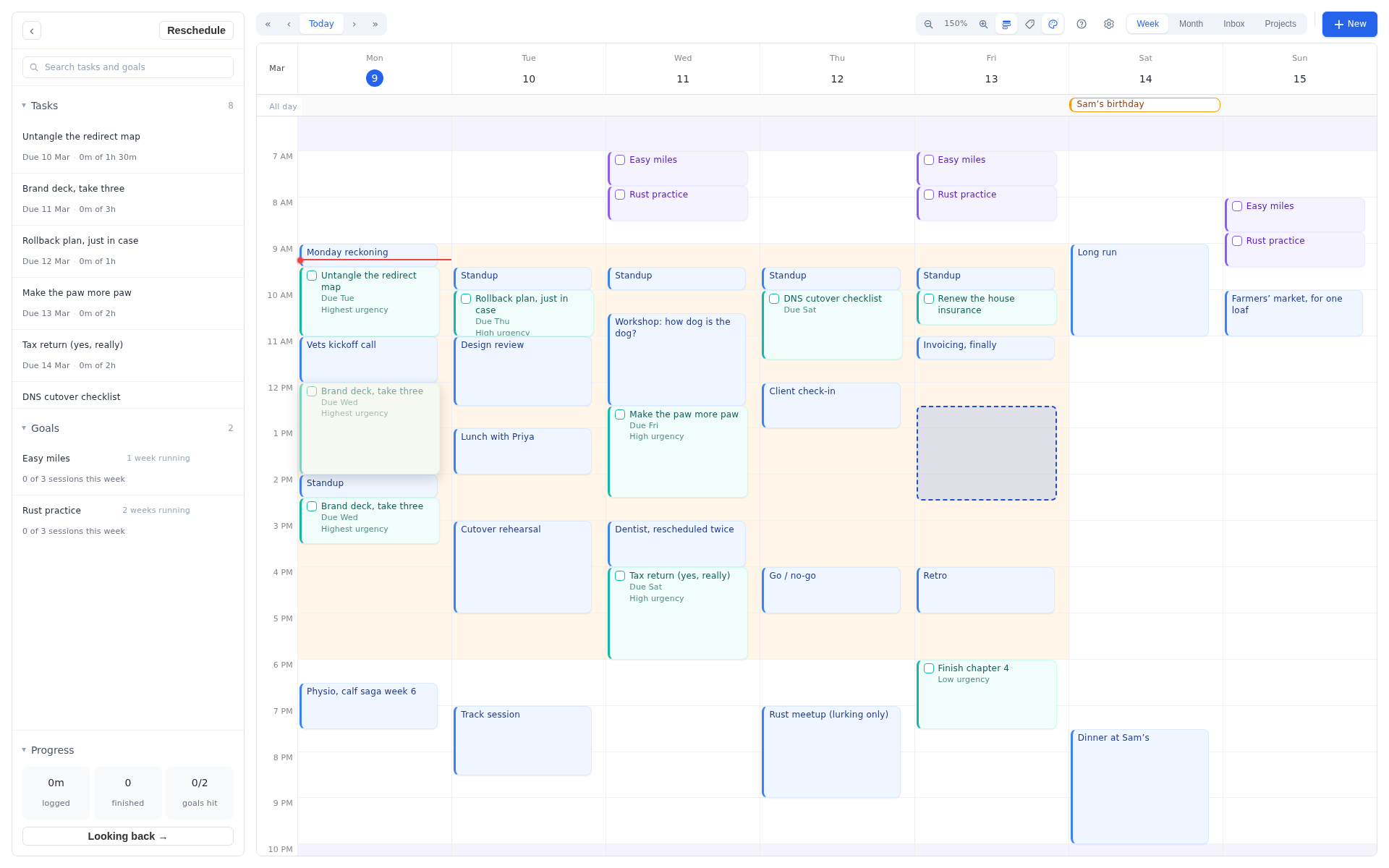
In Increment, a block stays wherever you drop it. While you drag or resize it, the rest of the week rearranges live. When you drop it, the block is pinned there, with no dialog in between. Double-clicking a block pins or unpins it, and Reschedule leaves pinned blocks where they are.
FlowSavvy asks what a drag means. Since a September 2024 update, dropping an auto-scheduled task shows buttons that depend on where you dropped it:
- "postpone until 4:30pm or later" on the same day;
- "Postpone until tomorrow or later" on a later date;
- "Try to schedule today" on an earlier date, with a popup to adjust things if the task doesn't fit;
- "Lock at 1:45pm" to fix the task in place.
FlowSavvy's approach gives finer control over what a move means. Increment's approach is quicker when you plan your week directly on the grid.
Price once you need FlowSavvy Pro
Increment is cheaper than FlowSavvy Pro on every billing option (October 2026):
| FlowSavvy Pro | Increment | |
|---|---|---|
| Monthly | $14 a month | £6 a month |
| Yearly | $120 a year ($10 a month) | £48 a year (£4 a month) |
| One-off | Not offered | £120 for Lifetime, including future updates |
FlowSavvy charges in US dollars and Increment in pounds. Converted to dollars, Increment's monthly and yearly prices are around half of FlowSavvy Pro's. Increment's Lifetime plan costs about the same as one year of FlowSavvy Pro billed annually. Students can get 30% off Increment's Yearly or Lifetime plans by emailing [email protected] from an institutional address. Compare more prices in the AI calendar comparison.
Increment starts with a 14-day trial that needs an email address and no card. FlowSavvy offers a 7-day Pro trial alongside its free plan.
Calendars: how each app works with Google, Outlook and iCloud
Both apps read your existing calendars and can show their own plan in them. They differ in how they connect and on which plans.
- FlowSavvy syncs with Google, Outlook and iCloud on every plan. Sending FlowSavvy's tasks out to those calendars is Pro-only (pricing).
- Increment connects Outlook by signing in with read-only access. Google, iCloud, school timetables and any other calendar can be connected by pasting a link (here is where to find Google's). Increment's plan can be exported through Share a calendar, a link that Google Calendar, Apple Calendar or Outlook can subscribe to. This is included on every plan.
When FlowSavvy is the better choice
FlowSavvy is the better fit if any of these matter to you:
- Native phone apps. FlowSavvy has web, iOS and Android apps. Increment runs in the browser and installs as a web app on phones and computers, but it isn't in the App Store or Google Play.
- Reminders. FlowSavvy sends a push notification when each task or event starts. Increment has no notifications or reminders.
- A permanent free plan. If 3 repeating tasks, 1 set of hours and due-date-only priority are enough for you, FlowSavvy Free costs nothing. Increment has a free demo and a 14-day trial, but no free plan.
- Integrations. FlowSavvy Pro includes an API, MCP and Zapier. Increment has none of these.
Which to choose
- Choose Increment if you are about to pay for FlowSavvy Pro, or have already outgrown its free plan. It is cheaper and has no caps, and it adds goals for habits, projects and folders that set hours and urgency for their work, and a record of where your time went.
- Choose Increment if your week includes standing intentions, such as exercise, reading or practice, that need a set amount of time rather than a due date.
- Choose FlowSavvy Free if your needs fit inside its limits and you don't want to pay.
- Choose FlowSavvy Pro if you need native phone apps, push reminders, Zapier or an API, or tasks written into your Google or Outlook calendar.
For how Increment compares with other schedulers, see Increment vs Reclaim and Increment vs Morgen.
Questions
What are the limits of FlowSavvy's free plan?
FlowSavvy Free allows 3 repeating tasks, 1 set of scheduling hours and 5 task lists. It has no priority levels (tasks are prioritised by due date), no dependencies, and 30 days of task history. Syncing FlowSavvy's tasks out to Google, Outlook or iCloud is Pro-only.
How much does FlowSavvy Pro cost compared with Increment?
FlowSavvy Pro is $14 a month or $120 a year ($10 a month). Increment is £6 a month, £48 a year or £120 once, and every plan has no caps. Increment's monthly and yearly prices are around half of FlowSavvy Pro's.
Does FlowSavvy have goals like Increment?
No. FlowSavvy treats habits as repeating tasks, and each occurrence has a due date. Increment treats goals differently from tasks, enabling users to schedule flexible time such as "three 60-minute sessions a week", spread across multiple days and tracked with streaks.
Does Increment have a mobile app or notifications?
Increment is not in the App Store or Google Play, but it installs as a web app on phones and computers. It has no notifications or reminders, whereas FlowSavvy has native iOS and Android apps and push notifications.
Is there a free version of Increment?
Increment has no free plan. It offers a free demo and a 14-day trial that needs no card. FlowSavvy has a permanent free plan.
Open Increment's free demo to drag blocks around a ready-made week of events, tasks and goals, and watch the rest of the plan rearrange as you go.
Try the demo