Habit Scheduling Apps: How Each Kind Fits "Three Times a Week" Into Your Calendar (2026)
A habit scheduling app takes a recurring intention, such as "gym three times a week" or "four hours of reading a week", and turns it into sessions at real times in your calendar, around your meetings and other work. Few apps do all of that. Habit trackers count sessions but leave the timing to you. Calendars repeat an event at a fixed time on fixed days. Auto-schedulers find free time for you, but many of them only repeat tasks on set days, and that does not fit flexible aspirations such as "some time each week". Before choosing an app, check two things: whether it accepts a number of sessions per day, week or month without fixed days, and what it does with a session that gets missed or pushed out.
The three kinds of habit app
Habit apps fall into three groups. What separates them is who decides when each session happens.
| Kind of app | Examples | Who picks the time | Handles "3 times a week, any days" |
|---|---|---|---|
| Habit tracker | Habitify, Griply, Lunatask | You, or a fixed time you set | Counts towards a weekly target, but places nothing in free time |
| Calendar with repeating events | Google Calendar | You, once, for every repeat | No. The event repeats on fixed days |
| Auto-scheduler with habits or goals | Reclaim, Goaly, Increment | The app, in your free time | Yes |
| Auto-scheduler with repeating tasks only | Motion, FlowSavvy | The app, on or around set days | Not that we could confirm |
A habit tracker is the right tool if you already know when the habit happens and only want to be reminded and keep a streak. If the problem is that the week fills up before the gym gets a slot, you need an auto-scheduler that has habits as their own kind of item.
Why "three times a week" is hard for an ordinary calendar
An ordinary calendar can only repeat an event on a pattern of dates, so "three times a week" has to become "Monday, Wednesday and Friday at 7am". Google Calendar's help page describes repeating events as choosing "how often" an event repeats and when the series ends. The calendar does not move a Wednesday session when a meeting lands on it, and it does not know that you have already been twice this week.
Google Calendar used to do more than this. Its Goals feature, added in 2016, asked how often and for how long you wanted to do something and at what time of day, then found time for the sessions. Google retired it in November 2022, and 9to5Google reported that existing goals would "remain on your calendar but won't repeat anymore". Google's suggested replacements were repeating events, repeating tasks and focus time. None of them finds time by itself. That gap is why separate habit scheduling apps exist.
Habits and repeating tasks are different things to a scheduler
To a scheduler, a habit is time you want to spend each period. A repeating task is a piece of work that falls due each period. The difference decides what happens when the week goes wrong.
A repeating task has a due date. "Gym on Monday" set up as a repeating task is late if Monday fills up, and the app may leave it late. Motion's scheduling FAQ says that if you miss a recurring task, Motion "will not automatically reschedule that specific instance later in the same week". The missed instance counts as overdue and the next one keeps its original date. That suits a weekly report. It does not suit exercise, where the aim is three sessions on any three days.
A habit or goal has a target and no deadline. The scheduler's job is to find enough sessions in the period, spread them sensibly, and stop once the target is met. Apps that treat habits as their own kind of item can do that. Apps that only have repeating tasks make you choose the days in advance.
The habit settings that change how a week turns out
These are the settings worth checking in any habit scheduling app, because each one changes where sessions end up:
- Frequency as a count per period. "3 sessions a week" lets the app choose the days. "Monday, Wednesday, Friday" ties its hands. Check whether the app offers per day, per week and per month, or only some of them.
- Session length, and the shortest acceptable session. An app that can place a 30-minute session when it cannot find a full hour keeps a habit going in a busy week.
- Allowed hours. Reading belongs in the evening and a run before work. The app should let you restrict each habit to your personal schedule.
- Priority when time runs short. In a full week, something has to give. Look for a setting that decides which habit gets the scarce time and which one waits.
- Spreading across days. Three sessions on Tuesday are not three gym sessions in a week. A scheduler should spread a habit's sessions across different days.
- What happens to a missed or bumped session. Some apps move it automatically, some wait until you ask, and some leave it missed.
- A record against the target. If you want to know whether you actually went three times a week across a term, the app needs to keep logged sessions and show them against the target.
How habit scheduling apps handle habits, app by app
The apps below were chosen because they come up for this search and either schedule habits or are commonly used for them. Prices are as checked in November 2026.
Reclaim
Reclaim has Habits as their own kind of item, and it places habit sessions in your calendar by itself. In a June 2021 update Reclaim added the option to "make a Habit happen X times per week across multiple days", and biweekly, monthly and quarterly frequencies followed in November 2021.
Reclaim's help article on Habits describes the settings:
- an ideal time, which Reclaim tries to stay close to;
- a minimum and maximum duration, so a session can shrink to fit;
- priority from Critical to Low;
- sessions that switch between free and busy to keep the calendar flexible.
When no slot is available, Reclaim either leaves the habit on the calendar with a warning or removes it. Its Habits page lists "Auto-rescheduling for conflicts (PTO, meetings, etc.)". The help article notes that it describes Reclaim 1.0, and Reclaim 2.0 has separate documentation.
On Reclaim's pricing page the free Lite plan schedules one week ahead. Starter costs $10 per seat a month billed annually or $12 monthly, and schedules eight weeks ahead (November 2026). For a full comparison of how Reclaim and Increment each schedule a week, see Increment vs Reclaim.
Goaly
Goaly is an iPhone app that books goal sessions into Google Calendar. Its App Store listing says it "looks at your Google Calendar, finds the free slots, and schedules your goal as real calendar events", and that it reschedules a session when a meeting takes its slot. You set a goal as a number of sessions per week, and Android Police describes choosing the session length and the time of day you prefer.
The listing says "Only for iPhone". The first goal is free with full scheduling. Goaly Pro unlocks unlimited goals, streaks and custom day hours, and costs €3.99 a month, €21 a year or €11.99 once on the Estonian App Store (November 2026). Goaly suits someone who lives in Google Calendar on an iPhone and wants one or two habits placed automatically, without a separate planner.
Lunatask
Lunatask is a task and habit app in which habits can appear on its calendar, but at a time you choose rather than a time it finds. Its habits documentation says that setting an "at time" makes a habit appear on the calendar at that time each day, with a reminder. You can also drag habits onto the calendar from a widget.
Weekly habits are "tracked per whole week", so the day you log them does not matter. The free plan is limited to seven habits.
Griply
Griply is a goal and habit app that accepts targets such as three times per week but does not place them in the calendar. Its habits help page says a target habit "shows on Today every day until the period's target is met" and "does not pre-fill calendar days in advance". To give a session a day, you drag it onto the calendar or switch the habit to specific weekdays. Reminders can be set at a fixed clock time or relative to a habit's start time.
Habitify
Habitify is a habit tracker: it counts sessions against a target and reminds you, but does not schedule them. Its weekly habit article describes a goal set as "[number] [unit] per week", with reminders as you scheduled them until the weekly goal is complete. Nothing in it places a session in free time around your other commitments.
Motion
Motion auto-schedules tasks, and its recurring tasks repeat on set days rather than a count per period. Motion's task help lists these frequencies:
- daily, or only on weekdays;
- weekly, on chosen days of the week;
- monthly, on a chosen day such as the 15th or the last Friday;
- custom intervals, such as every two weeks.
We found no "times per week" option in the help pages. Motion's FAQ says a missed instance is not rescheduled later in the same week.
FlowSavvy
FlowSavvy is an auto-scheduler, it can model habits as repeating tasks. Its page on replacing Google Calendar Goals describes making a task repeat daily, weekly, every other day or monthly, and says FlowSavvy "will automatically find another time for your goal" if plans change. We could not confirm a "times per week" setting from FlowSavvy's own pages.
On FlowSavvy's pricing page the free plan allows three repeating auto-scheduled tasks, one set of scheduling hours, and scheduling up to two weeks ahead. Pro removes the repeating-task limit and costs $14 a month, or $10 a month billed yearly (November 2026). Someone with more than three habits will need Pro. The Increment vs FlowSavvy post covers the rest of the comparison.
Increment
Increment is a calendar app with goals as a separate kind of item from tasks and events. A goal is set as a number of sessions of a given length per day, week or month. For example "3 sessions of 60 minutes a week". The scheduler places the sessions in free time around your fixed events, spreads them across different days, and stops once the target is reached. Goals have no deadline and are never finished, so a missed week does not leave anything overdue.
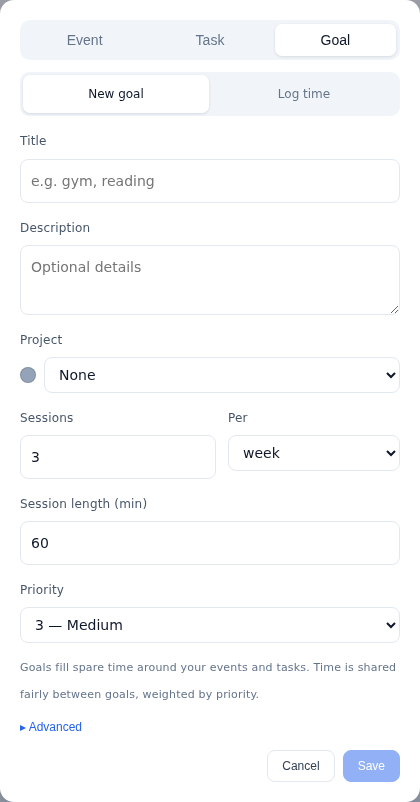
A goal in Increment has these settings that change where its sessions go:
- Sessions, Session length (min) and Per set the target, such as 4 sessions of 60 minutes per week for reading.
- Shortest session defaults to 15 minutes. Gaps shorter than that are skipped. Setting it to the full session length means the goal is only ever placed whole, which suits a gym session.
- Hours limits a goal to named stretches of the week that you define, such as personal hours before and after work.
- Priority runs from 1 to 5. When time is scarce, goals share it in proportion to their priority, and no goal gets more than its own target.
- Paused keeps a goal on record without scheduling it.
The scheduler places goals after pressing tasks (anything with a deadline or high urgency) and before all other tasks. A deadline therefore wins over the gym, and the gym wins over open-ended work. Increment's plan does not change by itself when the day goes off course. Pressing Reschedule plans the week again from where things stand: ticked-off sessions stay, and the plan is rebuilt around them. You can also drag a session to another time. It stays where you drop it, and the rest of the week rearranges around it while you drag.
Increment also has repeating tasks, including "2 times every 1 week", for work that recurs with a duration. If one turn of a repeating task cannot fit inside its own period, the part that fits is kept and the rest is dropped rather than piling up.
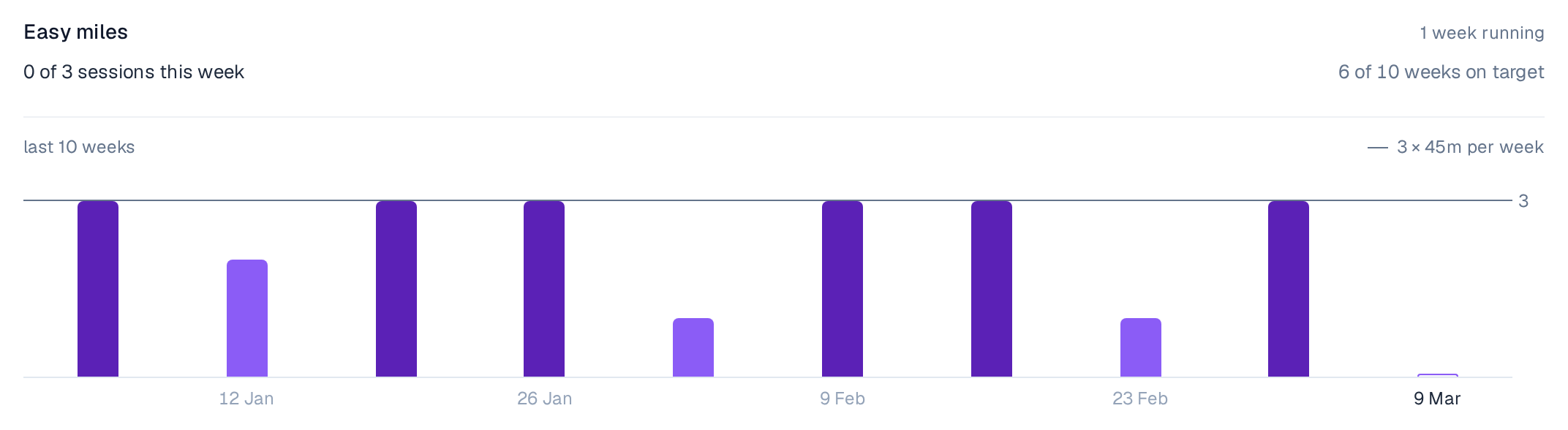
Pressing a goal's ring in the to-do list logs a session. The Goals tab of Looking back shows each goal week by week against its target, with streaks.
Increment is a web app that installs from the browser on a phone or desktop (how to install it). It costs £6 a month, £48 a year or £120 once for Lifetime (November 2026), with every feature and no caps on goals, repeating tasks or sets of hours, and there is a 14-day free trial with no card. Google and iCloud calendars come in by pasting their calendar link (how to find Google's), and Outlook connects by signing in.
Habit scheduling apps compared
| App | Habit as its own item | "N per week" on any days | Finds free time itself | Missed or bumped session | Price (November 2026) |
|---|---|---|---|---|---|
| Reclaim | Yes (Habits) | Yes | Yes | Rescheduled automatically, or flagged or removed if no slot | Free Lite; Starter $10–12 per seat a month |
| Goaly | Yes (goals) | Yes | Yes, in Google Calendar | Rescheduled if a meeting takes the slot | First goal free; Pro €3.99 a month or €11.99 once |
| Increment | Yes (goals per day, week or month) | Yes | Yes | Placed again when you press Reschedule | £6 a month, £48 a year, £120 once |
| FlowSavvy | No (repeating tasks) | Not confirmed | Yes | Moved to another time | Free (3 repeating tasks); Pro $10–14 a month |
| Motion | No (recurring tasks) | No option found | Yes | Not rescheduled within the same week | Not checked |
| Lunatask | Yes | Weekly habits on Premium | No, fixed time or drag | Not stated | Free plan up to 7 habits |
| Griply | Yes | Yes, as a target | No, drag onto calendar | Shows on Today until target met | Not checked |
| Habitify | Yes | Yes, as a target | No | Reminders continue until target met | Not checked |
| Google Calendar | No (Goals retired 2022) | No | No | Stays where it was | Free |
Which kind of habit app to choose
The right app depends on what keeps the habit from happening.
- You know when the habit happens and forget to do it. A habit tracker with reminders, such as Habitify or Griply, is enough.
- You want one or two habits placed into Google Calendar from an iPhone. Goaly does that, and its first goal is free.
- You want habits placed and moved automatically whenever your calendar changes, and you work in Google or Outlook. Reclaim's Habits are built for that.
- Your habits compete with deadlines, coursework or client work for the same hours. Choose an auto-scheduler that treats goals separately from tasks, lets you set hours and priority for each, and has no cap on how many you keep. Increment does this, at a lower price than most premium auto-scheduler plans, and lets you move any session by hand. Time blocking doesn't work until you automate it explains why manual blocks for habits tend to fall apart.
- Your "habits" are really recurring pieces of work with due dates, such as a weekly report. A repeating task in Motion, FlowSavvy or Increment fits better than a habit.
Questions
What is a habit scheduling app?
A habit scheduling app takes a recurring intention, such as gym three times a week, and turns it into sessions at real times in your calendar, around your meetings and other work. Few apps do all of that: trackers count sessions, and calendars repeat events at fixed times.
Can Google Calendar schedule a habit three times a week?
Not on its own. A Google Calendar event repeats on fixed days, and it does not move a session when a meeting lands on it. Google retired its Goals feature, which found time for sessions, in November 2022.
What is the difference between a habit and a repeating task in a scheduler?
A habit is time you want to spend each period, with a target and no deadline. A repeating task falls due on a date, so if you miss it, it can be left overdue. Motion, for example, does not reschedule a missed recurring instance later in the same week.
Which habit scheduling apps can place sessions on any days of the week?
Reclaim, Goaly and Increment let you set a number of sessions per week and choose the days for you. Motion and FlowSavvy repeat tasks on set days, and we could not confirm a times-per-week option in either.
What should I check before choosing a habit scheduling app?
Check whether it accepts a number of sessions per day, week or month without fixed days. Also check what it does with a session that is missed or pushed out. Session length, allowed hours, priority and spreading across days matter too.
Try Increment's free demo on a sample week, then add a goal such as "gym three times a week" and see where the sessions land around everything else.
Try the demo