Increment vs Morgen: Scheduling, Calendars and Price Compared (2026)
Morgen and Increment both put your tasks onto a calendar, but they suit different people. Morgen is a full calendar app. It connects to Google, Outlook and iCloud, pulls tasks in from Notion or Todoist, and writes approved time blocks back to your calendar. It also has booking links, native phone apps and team plans, and costs $15 a month billed yearly. Increment is a planner for one person's own week. It places tasks and weekly goals around your fixed events on its own grid, replans when you press Reschedule, and keeps everything on your device. It costs £4 a month billed yearly, or £120 once. If you need your plan to appear inside Google Calendar, or you need to book meetings with other people, choose Morgen. If you want one person's to-do list and habits fitted around a timetable, Increment does that for less money.
For a wider comparison of AI calendars, including Motion, Reclaim and Sunsama, see The Best AI Calendar in 2026.
Increment and Morgen side by side
The table compares the two apps on the points that most often decide the choice. Morgen details come from Morgen's own pages, which are linked in the sections below, and were checked in October 2026.
| Increment | Morgen | |
|---|---|---|
| What it schedules | Tasks (with durations and deadlines) and goals (sessions per week) around fixed events | Tasks from Morgen and connected task apps, placed inside "Frames" |
| How a plan is made | Deterministic scheduler, run when you press Reschedule | AI Planner proposes a plan; nothing is scheduled until you approve it |
| How far ahead it plans | 14 days | 1 to 7 days at a time |
| Calendar connections | Outlook by sign-in (read-only); Google, iCloud and others by iCal link or file | Google, Outlook, iCloud, Fastmail, CalDAV and more by sign-in |
| Writes to your other calendars | When you publish your calendar | Yes, after you approve a plan |
| Task app integrations | None | Notion, Todoist, ClickUp, Linear, Google Tasks, Microsoft To Do, Apple Reminders, Obsidian |
| Booking links | No | Yes |
| Notifications | No | Yes (conflicts, missed tasks) |
| Platforms | Browser on desktop and phone; installable web app | Windows, macOS, Linux, iOS, Android, web |
| Teams | No | Teams plan, minimum two seats |
| Cheapest price | £48 a year, or £120 once | $15 a month billed yearly |
| Trial | 14 days | 14 days |
How Morgen schedules tasks
Morgen schedules tasks through its AI Planner. The planner builds a draft plan, and you approve it before anything goes on your calendar. According to Morgen's AI Planner page, the plan is based on the "Morgen Priority Factor", which weighs priority, due dates and time estimates. It also takes into account your available capacity and your Frames.
Frames are recurring blocks of time set aside for one type of work, such as deep work or personal admin. Each Frame has filters (tags, projects or task source), so only matching tasks are placed inside it. Morgen says that "Plans without Frames tend to be less realistic and optimal", so setting up Frames is part of using Morgen well. The plan-your-day guide describes the process. You start the planner and review the proposed blocks, which pulse in preview. You can resize or drag them, then press "Schedule all". The planner can pad estimates by 20%, split large tasks into sessions and leave breaks.
For habits, Morgen has Routines, which Morgen describes as "fixed-time recurring habits with completion tracking".
How Increment schedules tasks and goals
Increment schedules work using an intelligent planning algorithm. It takes each task by priority and searches for the earliest time that task can happen, factoring in that tasks in some projects may only occur during certain hours (similar to Morgen frames). Priority combines how close the deadline is with the task urgency. Tasks can be split into pieces, given an earliest start date, made to wait for other tasks or be made to repeat (good for daily chores).
Goals are the main difference from Morgen. A goal in Increment is a standing target, such as "three 60-minute sessions a week". Increment does not give a goal a fixed slot. It fits the sessions into whatever time is left after events and tasks, and spreads them across different days. When time is short, goals with higher priority get a bigger share. Morgen's Routines sit at fixed times instead.
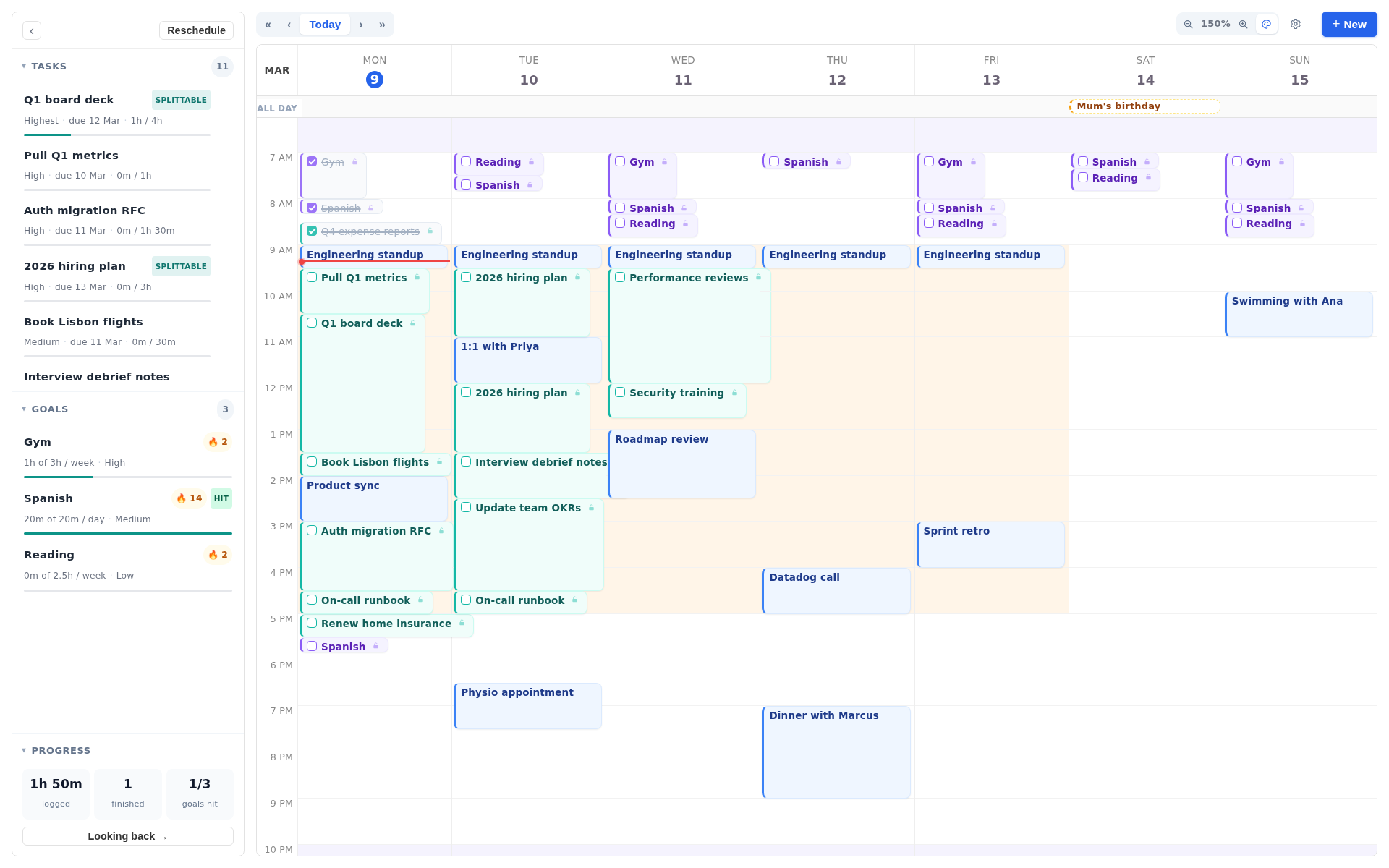
Increment does not drop a task that cannot fit before its deadline. It places the task anyway and marks it at risk, showing how many minutes could not be fitted in time.
Replanning when the week changes
Morgen replans when you ask and tells you when something goes wrong. The AI Planner page describes what Morgen does. If a new event clashes with a scheduled task, Morgen sends a notification, and one click moves the task. Tasks left unfinished from the day before also trigger a notification. You can then reschedule them as soon as possible, rearrange the current plan around them, or unschedule them. The rescheduling guide adds keyboard shortcuts. Shift + R reschedules a single session and Shift + S splits off the remaining time.
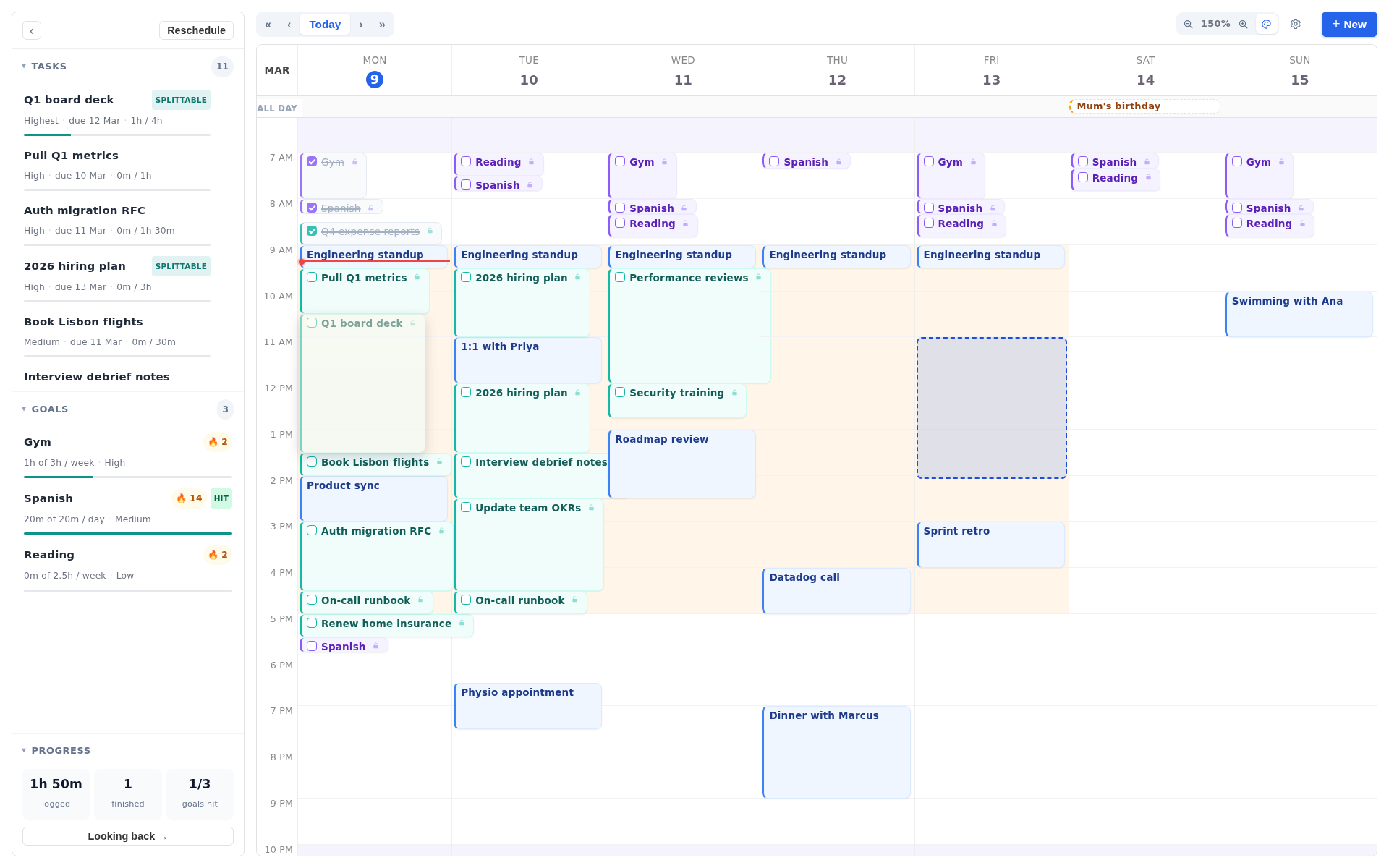
You can rerun the Increment planning engine by pressing Reschedule. A few edits also trigger a replan by themselves, such as creating a busy event or manually dragging a block. The philosophy of Increment is to present a plan that should work, but to recognise that life can't really be time blocked to the minute: which is why the Increment plan is a flexible suggestion, that the user can change and update with ease.
Connecting your calendars
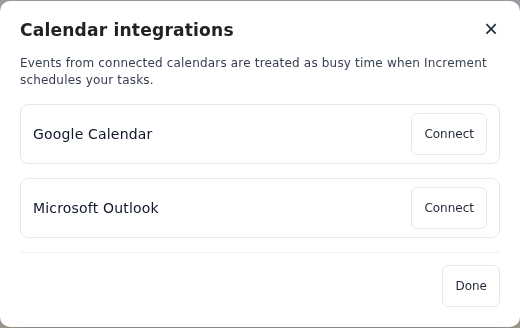
Morgen's integrations page lists Google Calendar and Outlook (including shared and team calendars), iCloud, Fastmail and CalDAV providers such as Yahoo, Zoho and Nextcloud. Subscription calendar feeds are listed as desktop only. Morgen's time-blocking guide says you can choose which connected calendar a scheduled task goes on, and set a default. Your plan therefore appears in Google Calendar or Outlook wherever you look at them.
Increment can import from other calendars by subscribing to their url, and can export to other calendars by publishing a url. Each imported calendar has a separate Counts as busy switch, so you can see a colleague's calendar without it blocking your own time.
Task apps, booking links and teams
Morgen has three groups of features that Increment does not have at all.
- Task apps. Morgen brings in tasks from Notion, Todoist, ClickUp, Linear, Google Tasks, Microsoft To Do, Apple Reminders and Obsidian. Morgen says that marking a task complete in Morgen updates the source tool. In Increment, tasks are typed into Increment's own forms.
- Booking links. Morgen Pro includes a booking page and scheduling links, checked against your busy calendars. Increment has no booking links and does not arrange meetings between people.
- Teams. Morgen has a Teams plan with team availability and round-robin scheduling. Increment plans one person's week, and two accounts cannot edit the same calendar.
If any of these is part of how you work, Morgen is the better choice, and Increment is not a substitute for it.
Phones and other devices
Morgen has native apps on more platforms. Morgen's getting-started guide lists desktop apps for Windows, macOS and Linux, a web app at web.morgen.so, and iOS and Android apps. The guide says the mobile apps can only be used "once you have set up your desktop".
Increment runs in a browser on desktop and phone. It can be installed as a web app that opens in its own window and works offline. There is nothing to download from the App Store or Google Play. The phone layout shows one day at a time and has tabs for Calendar, Inbox and Projects. For installation steps, see how to install Increment as an app.
Price: Increment vs Morgen
Increment costs less than Morgen and can be bought outright. Morgen's figures come from Morgen's pricing page. Morgen charges in US dollars and Increment in pounds. Prices were checked in October 2026.
| Increment | Morgen (individual) | |
|---|---|---|
| Monthly | £6 a month | $30 a month |
| Yearly | £48 a year (£4 a month) | $15 a month billed yearly ($180 a year) |
| One-off | £120 lifetime | None |
| Free trial | 14 days, no card needed | 14 days, no card needed |
| Free plan | None | None |
| Student discount | 30% off Yearly or Lifetime | 25% off for students, academics and non-profits |
Morgen also offers a 30-day money-back guarantee. Its Teams plan costs $10 per seat a month billed yearly, with a minimum of two seats (October 2026). Every Increment plan includes every feature. You can try Increment without a card by using the interactive demo, which runs the real app over a ready-made week and saves nothing.
Privacy and where your data is kept
Morgen says its data is "stored in Switzerland or the EU" and that it is GDPR compliant. Calendars connect through OAuth with each calendar provider.
By default, Increment stores your calendar locally in your browser on your device. With only a licence key, nothing is sent to a server, and the app works with no account. An account adds sync between your own devices through Increment's server.
Should you choose Increment or Morgen?
Choose Morgen if any of these apply:
- your tasks already live in Notion, Todoist, ClickUp or Linear;
- you book meetings with other people or plan as a team;
- you want native phone apps and notifications when a plan breaks.
Choose Increment if these apply:
- you plan your own week, and your fixed commitments come from a timetable, a work calendar or a rota;
- you want standing goals, such as exercise or practice, fitted into whatever time is left each week instead of fixed slots;
- you would rather pay £48 a year or £120 once than $180 a year;
- you want the plan stored on your device, with no account required.
If you are also considering Reclaim, see the similar comparison in Increment vs Reclaim.
Questions
What is the difference between Increment and Morgen?
Morgen is a full calendar app that connects to many calendars and task apps, writes approved plans back to your calendar, and has booking links and team plans. Increment is a planner for one person's own week that fits tasks and weekly goals around fixed events on its own grid and keeps data on your device.
Is Increment cheaper than Morgen?
Yes. Increment costs £4 a month billed yearly (£48 a year), or £120 once. Morgen costs $15 a month billed yearly ($180 a year) and has no one-off option.
Does Morgen or Increment have notifications?
Morgen sends notifications for conflicts and missed tasks. Increment has no notifications, reminders or alarms.
Can I try Increment or Morgen for free?
Both have a 14-day trial, and neither needs a card. You can also try Increment without any commitment in its interactive demo.
Open the Increment demo, add a task and a goal to a ready-made week, and press Reschedule to see how it plans compared to Morgen.
Try the demo