Deep Work Scheduling: How to Protect Long Focus Blocks Around Meetings
To schedule deep work, book blocks of at least 90 minutes for your hardest work before meetings fill the week. Put those blocks in the hours where meetings are least likely to land. If a meeting lands on one anyway, move the block somewhere else that day rather than giving it up. Block length matters because a meeting costs more than the hour it takes. Gloria Mark of the University of California, Irvine found that interrupted work was picked up again after an average of 23 minutes and 15 seconds, usually with two other tasks in between (Gallup interview, 2006). A 75-minute gap between two calls gives you much less than 75 minutes of focus.
How long a deep work block should be
A deep work block should be at least 90 minutes long, and two to four hours when the schedule allows it. Alfred's guide to scheduling deep work sets 90 minutes as the minimum, or 60 minutes for jobs that are mostly reacting to other people. Paul Graham's essay Maker's Schedule, Manager's Schedule (2009) asks for more. He says people who write or program "generally prefer to use time in units of half a day at least". He also says "a single meeting can blow a whole afternoon", because it leaves pieces on either side that are too short for serious work.
Deep work also has a daily limit. Todoist's guide to Cal Newport's Deep Work puts it at about four hours a day. In practice that means two blocks of about two hours, not one long day with nothing else in it.
Which deep work schedule to choose
Cal Newport's Deep Work describes four ways to schedule deep work. If you have regular meetings, the rhythmic approach is usually the easiest to protect: the same blocks at the same times most days. The definitions below follow Todoist's summary.
| Approach | What it looks like | Who it suits |
|---|---|---|
| Monastic | All working time goes on one deep pursuit | Very few people whose job includes meetings |
| Bimodal | Whole days or weeks of deep work, with the rest of the time normal | People who can clear whole days, such as two meeting-free days a week |
| Rhythmic | A few hours of deep work at fixed times, most days | People whose weeks are fairly predictable |
| Journalistic | Deep work fitted into whatever gaps appear | Experienced people; Todoist does not recommend it for beginners |
The rhythmic and bimodal approaches both depend on knowing where your fixed commitments are, so the rest of this article covers those two.
How to schedule deep work around meetings by hand
Scheduling deep work by hand comes down to seven steps. Do them once for the coming week and repeat whenever the week changes.
- Put the fixed commitments in first. Add the meetings you cannot move, plus lectures, school runs and travel, including anything that sits on another calendar. Be strict about what counts as fixed.
- Choose your deep work hours. Microsoft's Work Trend Index found that half of all meetings fall between 9 and 11 am or between 1 and 3 pm. Microsoft says those hours overlap with many people's natural productivity peak, and it calls 11 am the most overloaded hour of the day (Microsoft WorkLab, June 2025). Pick the hours when you think best and protect those first.
- Group meetings into one window. Ask for recurring meetings to move to the afternoons, or onto one or two days of the week. Graham holds office hours at the end of his working day, so that "these meetings are never an interruption".
- Book the blocks as busy events before anyone else books the time. Name each block after the task, such as "Draft chapter 3", not "Focus". A named block is harder to give away, and you know what to start on when it begins.
- Leave about a fifth of the day unscheduled. Alfred's guide suggests about 20%, or 30 to 40% for jobs that are mostly reacting to other people. A meeting that overruns then eats into that spare time, and the blocks after it stay where they are.
- Use the short gaps for shallow work. A 45-minute gap between calls is for email, admin and review, not for starting the hard task.
- When a meeting lands on a block, move the block that same day. Look for the next gap that holds the full length, not just the next free half hour. Newport puts the trade-off plainly: every time you say yes to a commitment, "you're also saying 'no' to an equivalent amount of deep work" (Cal Newport).
How to stop colleagues booking over focus time
A focus block only stops colleagues booking over it if it is on the calendar they book against and marked busy. A block in a separate planner does not do that. Two calendar apps have this built in:
- Google Calendar has a focus time event type that can automatically decline new meetings, or new and existing ones. It is available on the Business Standard, Business Plus, Enterprise, Education and Nonprofits editions of Google Workspace (Google Calendar Help).
- Outlook, through Microsoft's Viva Insights focus plan, books up to four hours of focus time a day on your calendar and can mute Teams chats during it (Microsoft Support).
A calendar entry only stops meetings that arrive as invitations. The same Microsoft report found that 57% of meetings were ad hoc calls without a calendar invite. It also found that people using Microsoft 365 are interrupted every two minutes by a meeting, email or notification. During a block, close chat and email as well as marking the time busy.
Why scheduling deep work by hand breaks down
Scheduling deep work by hand breaks down when the week changes faster than you can replan it. When a new meeting lands on a block, you need to find another gap that is long enough. That gap may already hold a shorter task, which then needs a gap of its own. By midweek the calendar no longer matches the work. Deep work suffers more than other work here because its replacement gap has to be long, and long gaps are what a busy week loses first. Time Blocking Doesn't Work (Until You Automate It) covers why time blocking in general fails this way.
How an auto-scheduler protects deep work
An auto-scheduler places your work into the free time between fixed events and places it again when they move, so it does step 7 for you. Three settings decide whether it gives you long deep work blocks or scattered half hours:
- the shortest piece a task can be split into;
- the hours each kind of work is allowed to use;
- whether your meetings calendar counts as busy.
If an auto-scheduler lets you set only one or two of these, deep work tends to end up in whatever gaps are left over.
How to set up deep work blocks in Increment
Increment is a calendar that schedules tasks and standing goals into the gaps around your fixed events. These are the settings that keep deep work in long blocks.
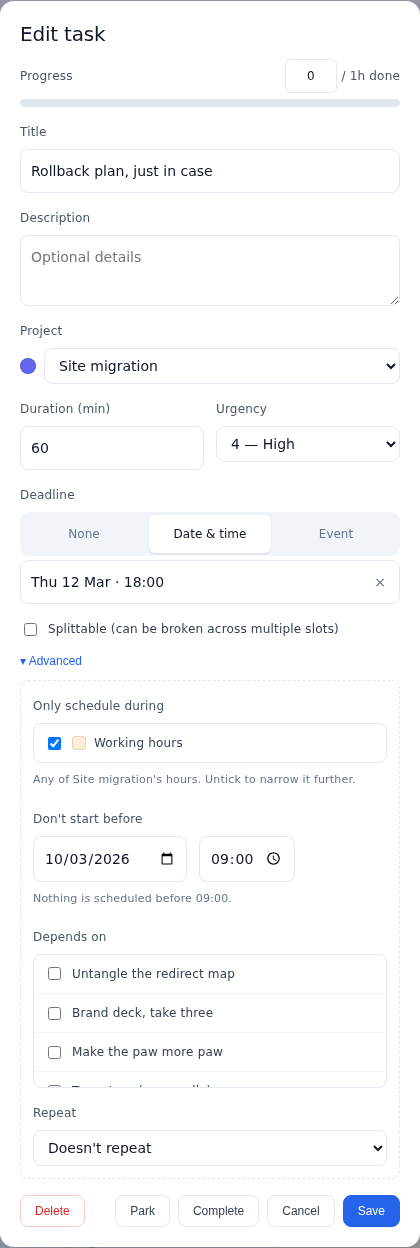
Stop deep work being split into short pieces. Every Increment task has a Can split setting, which is on by default, and a Smallest piece setting, which defaults to 30 minutes. For a task such as "Write the methods section", raise Smallest piece to 90 minutes. To keep a task in one sitting, turn Can split off, and Increment waits for an opening long enough to hold all of it.
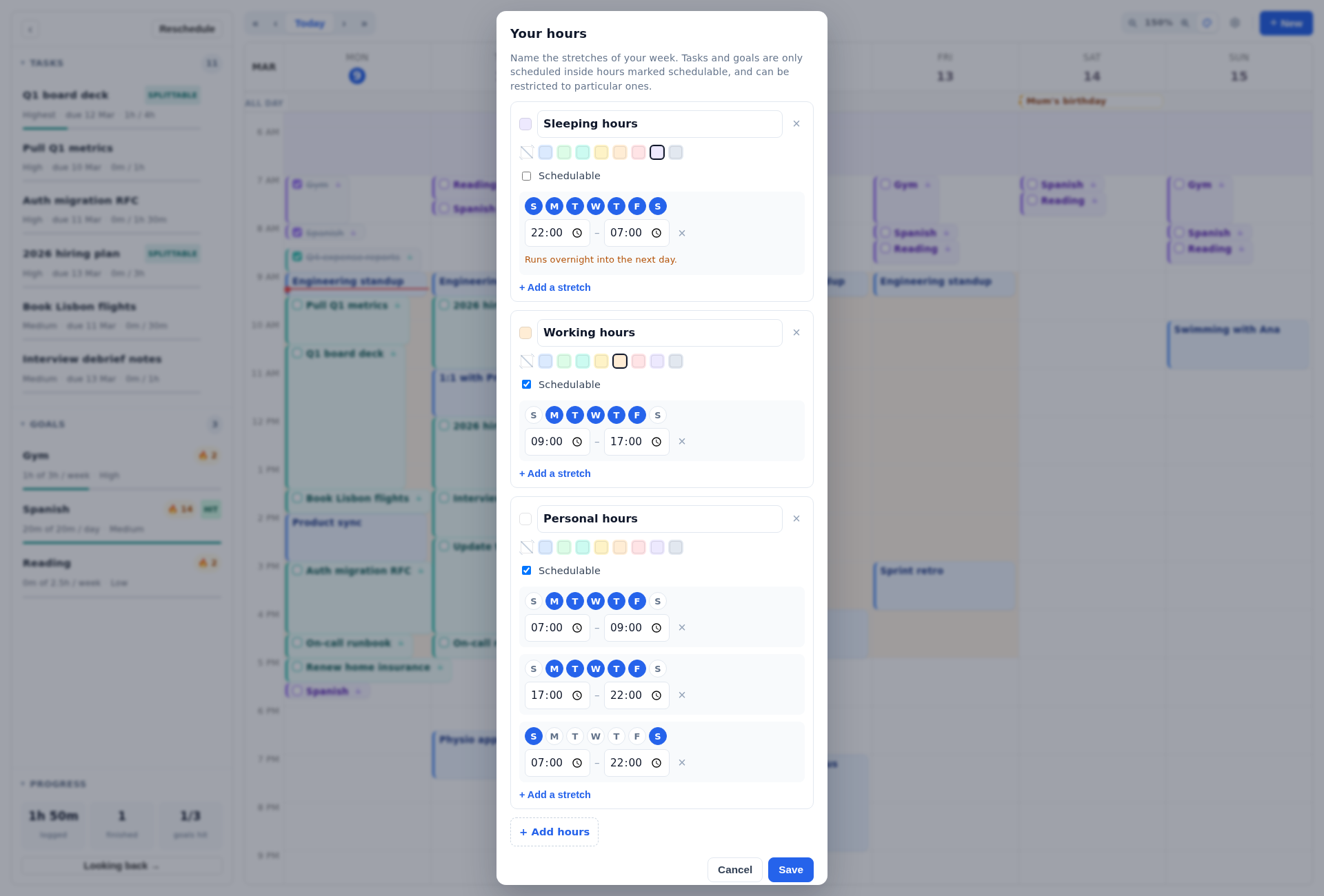
Give deep work its own hours. In Increment, Hours are named parts of the week, set under Hours…. A new calendar starts with Working hours of 09:00–17:00, Monday to Friday. Split that into two sets: "Focus hours" in the mornings and Working hours in the afternoons. Then limit deep work tasks to Focus hours and admin tasks to the afternoon set. A project or folder can set hours for everything inside it, so a "Thesis" project can be kept to Focus hours without editing each task.
Make regular deep work a goal. An Increment goal such as "Deep work, 4 sessions of 120 minutes a week" fits a rhythmic schedule. Set Shortest session to 120 minutes and the goal is only ever placed as a whole session. Its sessions are spread across different days, and no more are placed once the week's target is met. Increment places tasks with a deadline, or with urgency above Medium, before goals. In a week with a hard deadline, that deadline work gets your focus hours first and the goal gets what is left.
Bring your meetings in. Outlook connects to Increment by signing in. Google Calendar is added by pasting its secret address, and other calendars by pasting their link. Leave Counts as busy on for your work calendar. Turn it off for a colleague's calendar you only want to see.
When a meeting lands on a block, press Reschedule. Increment checks outside calendars every ten minutes. A new meeting changes which times are busy. Reschedule plans again from where things stand. It keeps completed and pinned blocks where they are and puts everything else, highest priority first, into the earliest free time that can hold it.
Pin the block you will not give up. Drag a block to where you want it and it stays pinned there. You can also double-click a block to pin it. Reschedule leaves pinned blocks where they are. Pinned blocks can also be published with Share a calendar, as a link colleagues can add to Google Calendar or Outlook, so they can see the time is taken.
Count the hours you actually got. Tick the circle on a block when you finish it. The Looking back page then shows the time you logged by project and the hours you worked each week, and every figure can be narrowed to a single project.
What Increment costs
Increment costs £6 a month, £48 a year or £120 once for Lifetime (November 2026). Every plan has every feature, and the 14-day trial needs no card.
Questions
How long should a deep work block be?
At least 90 minutes, and two to four hours when your schedule allows it. Alfred's guide sets 90 minutes as the minimum, or 60 minutes for jobs that are mostly reacting to other people.
How many hours of deep work can you do in a day?
About four hours a day, according to Todoist's guide to Cal Newport's Deep Work. In practice that means two blocks of about two hours.
What is the best deep work schedule if I have lots of meetings?
The rhythmic approach is usually the easiest to protect: the same blocks at the same times most days. If you can clear whole days, the bimodal approach, such as two meeting-free days a week, also works.
How do I stop people booking meetings over my focus time?
Put the block on the calendar colleagues book against and mark it busy. Google Calendar's focus time can auto-decline new meetings, and Outlook's Viva Insights focus plan books focus time on your calendar.
What should I do when a meeting lands on my deep work block?
Move the block the same day, to the next gap that holds its full length, not just the next free half hour. Every yes to a commitment is a no to an equivalent amount of deep work.
Can Increment schedule deep work blocks?
Yes. You can set a task's smallest piece to 90 minutes or turn off splitting, limit it to focus hours, or make a goal with 120-minute sessions. To let colleagues see a block, pin it and publish your calendar with Share a calendar.
Try the free demo, add a two-hour task that cannot split, and see where Increment finds room for it around a week of meetings.
Try the demo