How to Meet Deadlines: Work Back From the Date and Book the Hours
To meet a deadline, start from the due date and work backwards. Set your own finish date a little before it, break the work into steps and estimate each one. Then count the free hours you actually have between now and your finish date and book each step into them, starting with the steps that other steps wait on. Many missed deadlines are already lost in the first few days, because nobody compared the hours of work with the hours available. Do that comparison at the start. Then you know whether the deadline can be met while there is still time to cut the scope, ask for more time or clear other work.
Why deadlines get missed: the estimate is usually wrong
Deadlines are usually missed because people underestimate how long their own work will take. Psychologists call this the planning fallacy. In the best-known study, Buehler, Griffin and Ross (1994) asked 37 psychology students when they would finish their senior theses. Their average estimate was 33.9 days. The average actual time was 55.5 days, and only about 30% finished by the date they had predicted. When asked for a worst case, "if everything went as poorly as it possibly could", the students gave 48.6 days on average. Even that was a week short of the real time.
Roger Buehler, one of the study's authors, writes that the bias appears in tasks from household chores to subway construction. Conscientious people show it as well as procrastinators, and people often know their past completion times and still predict optimistically. Working harder in the final week cannot fix an estimate that was wrong in the first. The steps below correct the estimate and check it against real free time.
Step 1: Set your own finish date before the real deadline
Your own finish date should come before the official deadline. That leaves room for the things that tend to go wrong at the end: a final read-through, a formatting problem, an upload that fails, or someone who still has to sign it off. For work due in a fortnight, finishing a day or two early is usually enough room. If the work goes through a submission portal, a printer or another team, find out their real cut-off and plan back from that.
Plan from your finish date backwards, not from today forwards. In four experiments, Wiese, Buehler and Griffin (2016) asked people to plan a task backwards from its end, forwards from now, or in no set direction. In all four studies, the backward planners predicted later finish times. In the fourth study, their predictions were also less biased. The authors suggest that planning backwards makes people notice more of the obstacles, interruptions and competing demands that slow work down.
Step 2: Break the work into steps small enough to estimate
A step is small enough to estimate when you can picture doing it from start to finish, usually somewhere between half an hour and half a day. "Write the report" is too big to estimate with any confidence. "Pull the Q3 figures", "outline the four sections" and "draft section 2" are not. Buehler lists this breaking down of a plan into smaller steps (he calls it "unpacking") as one way to make predictions less optimistic.
Name each step after what will exist when it is done, so that you can tell when it is finished. Include the steps people tend to leave out:
- reading the brief and any earlier versions;
- gathering material, data or sources;
- sending work for feedback and acting on it;
- formatting, checking and submitting.
Step 3: Estimate each step, then check it against your record
Give each step an estimate in hours, then compare it with how long similar work took you last time. Buehler's research found that people base their forecasts on how they picture the work going and pay little attention to their own past times. Correct for that deliberately:
- If you have a record (timesheets, logged time, a similar task you remember well), use what that work really took, not what you planned for it.
- If you have no record, plan with the time you would need in a bad week. Remember that even the thesis students' worst-case estimates were too short.
Add up the steps. That total is the work. From now on, note how long each step really takes, so that your next estimate has something to go on.
Step 4: Mark which steps depend on others or on other people
Before you schedule anything, mark the steps that cannot start until something else has happened. These decide the order of the work, and often the date the work has to start. There are two kinds:
- Steps that wait on your own work. You cannot write the draft before you have the figures.
- Steps that wait on other people or events. Feedback from a manager or tutor, data from a colleague, a delivery or a published timetable. Each of these gives a later step an earliest start date. You cannot make the waiting time shorter, because it is not your time.
Book any step that starts someone else's clock, such as sending a draft for review, as early as you can. A day lost before a handover is a day lost at the end.
Step 5: Count the free hours you actually have
Your free time for a deadline is what is left of the calendar after fixed commitments, not the number of days until it is due. For each day between now and your finish date, take the hours you can work and subtract:
- meetings, lectures, shifts and appointments;
- travel between them;
- time already taken by other work with its own deadline.
Count days that are effectively gone as gone. A day of back-to-back meetings has no time for focused work in it, even if it has a few 20-minute gaps. Note which hours suit which steps as well. Drafting needs unbroken stretches, but checking references can fill a short gap.
Step 6: Compare the work with the free hours and decide now
Compare the total hours of work with the free hours before you book anything. If the work fits with room to spare, carry on. If it does not, decide now, while all the options are still open:
- Cut the scope. Agree what a smaller version of the work would look like.
- Ask for more time, early. If you ask in the first few days, give a reason and propose a new date, the other person can plan around it. If you ask the day before, they can only accept a late delivery.
- Move or drop other work that is using the same hours.
- Find more hours, if there are hours you are willing to give up.
Check the order as well as the totals. Work can fit across a fortnight and still miss the date because a step that someone waits on has to be finished in the first week. The worked example below shows this.
Step 7: Book each step into a specific time slot
Put every step into a specific slot in the calendar, in dependency order, using the earliest free time first. A step with a time attached is more likely to happen than a step on a list. Buehler points to research on "implementation intentions", meaning commitments to specific actions at specific times, which make people more likely to follow through.
When booking:
- Book the steps that other steps or other people wait on first.
- Split long steps into sessions that suit the work, such as 90-minute drafting sessions.
- Give steps that must be done in one sitting, such as a timed practice paper, a slot that holds all of them.
- Leave the buffer from step 1 empty.
If you plan most of your work from a list rather than a calendar, How to Move From a To-Do List to a Calendar covers the general change. The method here is for one deadline.
Step 8: Check progress each day and replan when work slips
Check each day whether that day's steps got done, and replan the rest as soon as something slips. A missed session still has to be done before the deadline, so its hours need a new slot. Your free time has also shrunk, so redo the comparison from step 6. The earlier you notice, the more of the options in step 6 are still open. Re-planning blocks by hand every time something moves is the usual reason time-blocking plans get abandoned. Time Blocking Doesn't Work (Until You Automate It) explains why.
Record how long each step really took. The gap between your estimate and the real time is what will improve your next estimate.
Worked example: a report due in two weeks
Take a report due at 17:00 on the Friday after next, starting on a Monday. The writer sets their own finish date a day earlier, at 17:00 on the second Thursday.
| Step | Estimate | Waits on |
|---|---|---|
| Read the brief and last year's report | 1 h | – |
| Pull the figures | 3 h | – |
| Outline | 1 h | Figures |
| Draft | 6 h, in 90-minute sessions | Outline |
| Manager reviews the draft | 2 working days (not the writer's time) | Draft |
| Revise | 2 h | Review |
| Format, check and submit | 1 h | Revision |
| Writer's own time | 14 h |
The writer's week has 37.5 working hours. Meetings take 12 of them and other ongoing work takes about 15, which leaves roughly 10 hours a week. That gives about 18 free hours before the Thursday finish date. The 14 hours of work fit, with 4 to spare.
The dependencies change that picture. Revising and submitting take 3 hours, and the review takes two working days. So the draft has to reach the manager by the end of the first Friday, which means the reading, figures, outline and draft (11 hours) must all fit into the first week's 10 free hours. The totals fit, but the order does not. The writer finds this out on Monday morning, not on the second Wednesday. They have time to move an hour of other work, or to ask whether the review can be done in one day.
When several deadlines need the same hours
When two pieces of work need the same hours, book the one with the nearer deadline or the bigger consequence first, then check that the other still fits. If both cannot fit, apply step 6 to whichever has more give, usually the one whose scope can be cut or whose date can move. Work with no deadline goes in after both. That includes standing commitments such as exercise or study sessions, so they need some protected time or they will disappear whenever a deadline arrives.
How to plan a deadline in a scheduler like Increment
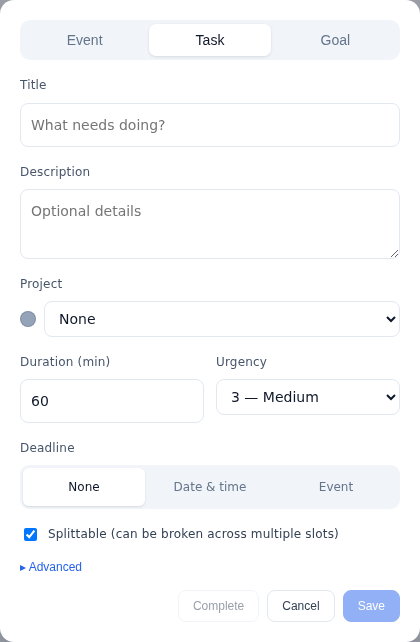
Increment is a calendar that does steps 5 to 8 for you once each step is entered with its estimate, deadline and dependencies. It finds the free time around your fixed events, places the work in order, and flags anything that will not fit in time. Each step is entered as a Task:
- Duration is your estimate from step 3.
- Deadline is either a date and time or an existing event, such as the meeting where the work is due.
- Urgency runs from 1 (Lowest) to 5 (Highest).
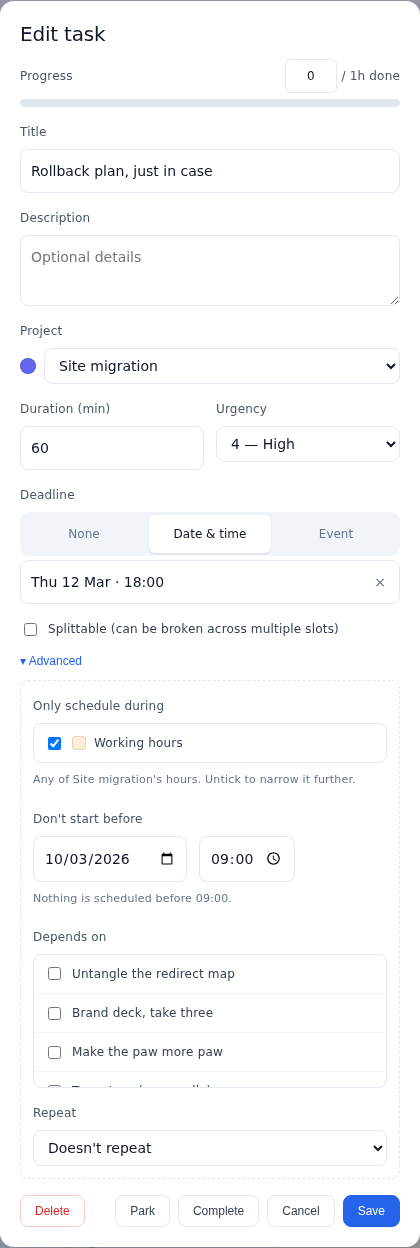
The settings under Scheduling match steps 4 and 7:
- Depends on lists the steps that must be scheduled before this one.
- Earliest start is the date, and optionally the time, before which no part of the task is scheduled, such as the day feedback is due back.
- Can split and Smallest piece decide whether a long step is broken into sessions and how short a session can be. A task that cannot split waits for a gap that holds all of it.
- Hours limits a step to certain hours, such as your working hours.
Increment's scheduler places pressing tasks first: tasks with a deadline, tasks with urgency above Medium, and any task one of those depends on. Each goes into the earliest free time that can hold it, around your fixed events. Tasks are ordered by priority, which combines how close the deadline is (60%) with the 1–5 urgency (40%). If a task cannot fit before its deadline, Increment still places it, marks it at risk, and shows how many minutes could not be scheduled in time. That is the comparison from step 6, made again every time you replan.
When the day goes off course, press Reschedule. Blocks you have ticked off or pinned stay where they are, and the rest of the week is planned again from where things stand. When the time you have logged on a task reaches its estimate, Increment asks whether to Mark complete or say it Needs longer and add minutes. Over time, that gives you the record of real times that step 3 depends on. Meetings come in from other calendars: Outlook connects by signing in, and Google Calendar, iCloud or a timetable can be added by pasting the calendar's link (how subscribing by link works).
Questions
How do you meet a deadline?
Start from the due date and work backwards. Set your own finish date a little before it, break the work into steps, estimate each one, count your real free hours, and book each step into a time slot, starting with the steps others wait on.
Why do I always miss deadlines?
Usually because people underestimate how long their own work takes, a bias called the planning fallacy. In the Buehler, Griffin and Ross study, students predicted 33.9 days for their theses but took 55.5 on average, and only about 30% finished on time.
What should I do if I can't finish by the deadline?
Decide early, while your options are open. You can cut the scope, ask for more time with a reason and a proposed new date, move or drop other work, or find more hours. Asking in the first few days lets others plan around it, while asking the day before only lets them accept a late delivery.
How early should I set my own deadline?
Set it before the official date to leave room for a final read-through, formatting problems, a failed upload or sign-off. For work due in a fortnight, a day or two early is usually enough.
How do I handle several deadlines at once?
Book the work with the nearer deadline or bigger consequence first, then check the other still fits. If both cannot fit, cut the scope or move the date of whichever has more give.
Tell Increment's free demo one thing you need to get done this week and how long it will take, and see whether it fits around a week that's already busy.
Try the demo