The Best Organisation Tools for Students in 2026
I started building Increment as a student, because I had a workload I couldn't see the end of and no idea when I was supposed to cook, clean or get to the gym. I had a to-do list. I had a calendar with my lectures in it. What I didn't have was any way of knowing whether the week in front of me was actually survivable — and that uncertainty was doing more damage than the work itself.
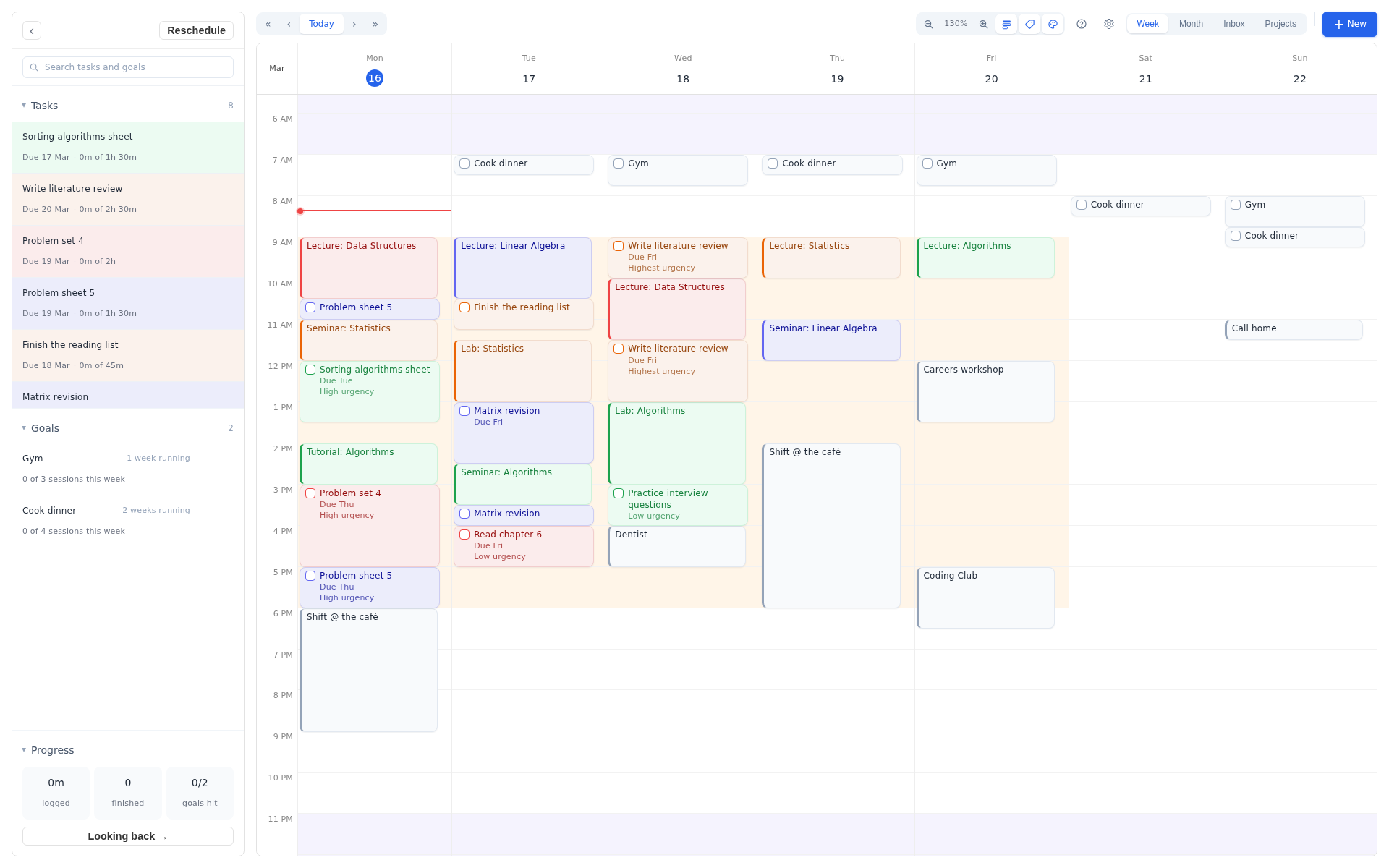
That's the gap most "best student apps" lists miss. They're full of excellent tools for storing things: notes, flashcards, references, deadlines. Very few of them address the question that keeps students awake, which is when, exactly, is all of this going to get done? This guide covers both, sorted by the job you need doing, with 2026 prices and student deals checked this week.
"Short answer: Google Calendar for classes, Zotero for references and Anki for revision are free and hard to beat. For deadlines, notes and the actual scheduling of your week, Increment covers all three in one place — add Notion or OneNote alongside it only if your notes are mostly scans, slides and images."
The five jobs a student system has to do
Nobody needs fifteen apps. They need one tool for each of five distinct jobs, and most of the confusion in this category comes from tools that claim to do all five and do three of them badly.
- Planning your time — deciding when the work happens, around lectures, shifts and everything else.
- Tracking deadlines and tasks — knowing what's due and what's coming.
- Notes — capturing lectures and reading in a form you can find again in April.
- Research and citations — collecting sources and producing a bibliography without losing an evening.
- Focus — putting the phone somewhere it can't reach you.
The first one is the one most students get wrong, because it doesn't feel like an organisation problem. It feels like a personal failing. It isn't: procrastination research consistently finds that roughly three-quarters of students consider themselves habitual procrastinators, and about half say it's a persistent problem — with poor planning, stress and overwhelming workload cited as the main drivers rather than laziness. A list makes the workload visible. It doesn't make it feasible.
Planning your time and workload
Increment
For when the problem is fitting everything in, not remembering it. 30% student discount: £33.60/year or £84 once.
This is the one I built, so treat the enthusiasm accordingly — but the reason it exists is a specific student problem that nothing else on this page solves. A to-do list tells you what's outstanding. A calendar tells you where your lectures are. Neither tells you whether the essay, the reading, the lab report and the group project can all physically fit into the eleven days before they're due.
Increment answers that by splitting your week into three kinds of thing:
- Events are fixed — lectures, seminars, shifts, the train home. They never move, and everything else is planned around them.
- Tasks are flexible work with a duration and usually a deadline: "essay draft, 6 hours, due the 14th." The scheduler finds the hours for them.
- Goals are hours you want each week rather than things you must finish — the gym, cooking properly, reading something that isn't on a reading list, a side project. They fill whatever time is left over, proportionally.
That third type is the whole reason I built it. In a purely deadline-driven planner, anything without a due date loses every fight and never gets scheduled, which is exactly how a term ends with you having eaten badly for eleven weeks. Goals make the leftover time do something on purpose.
The parts that matter during a bad week:
- Reschedule is one press. A seminar overruns, a deadline moves, you lose a morning — one action re-flows every flexible task around the change instead of you dragging blocks about.
- You can overrule it. Drag, resize or pin anything in place and the scheduler works around what you've fixed.
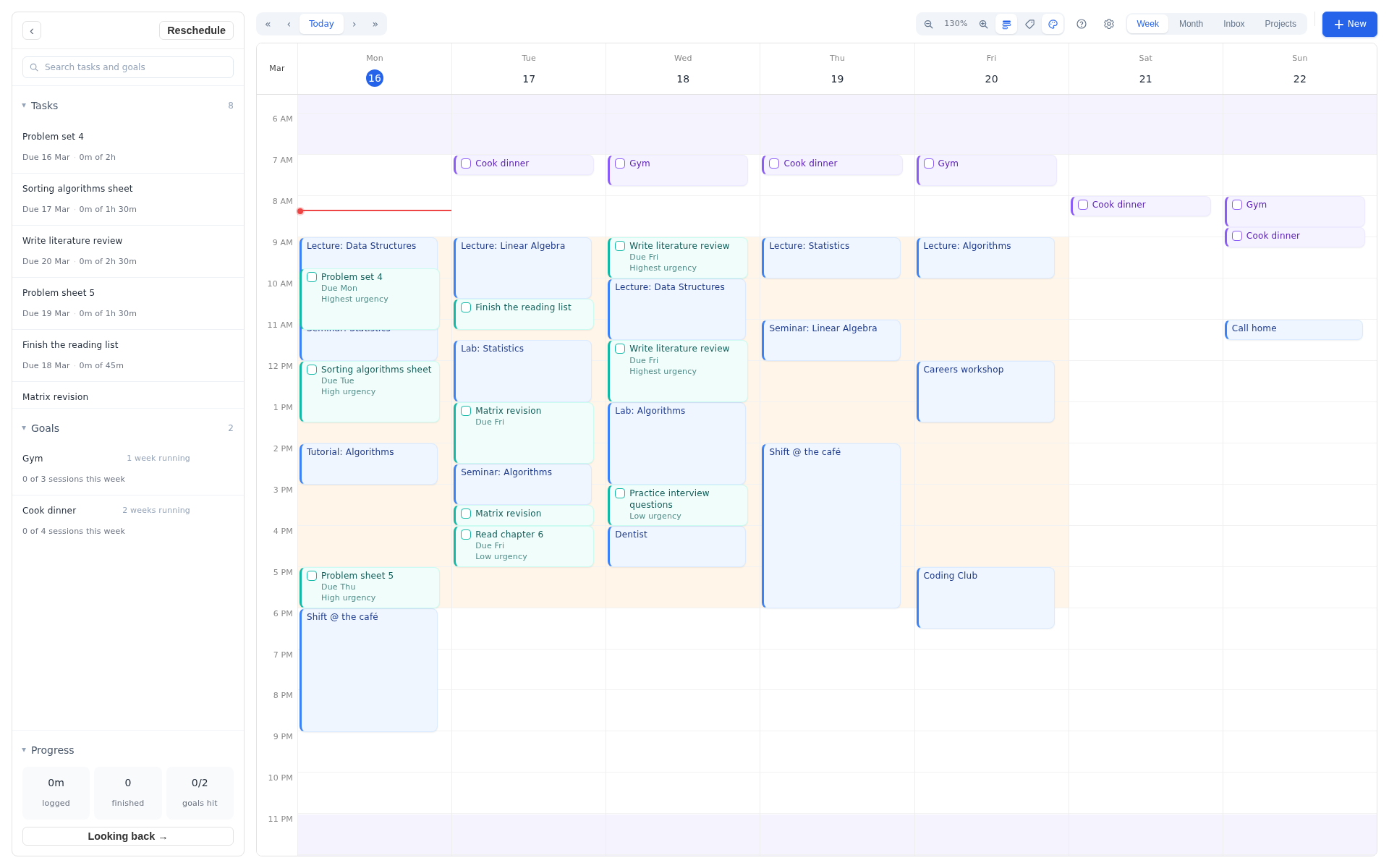
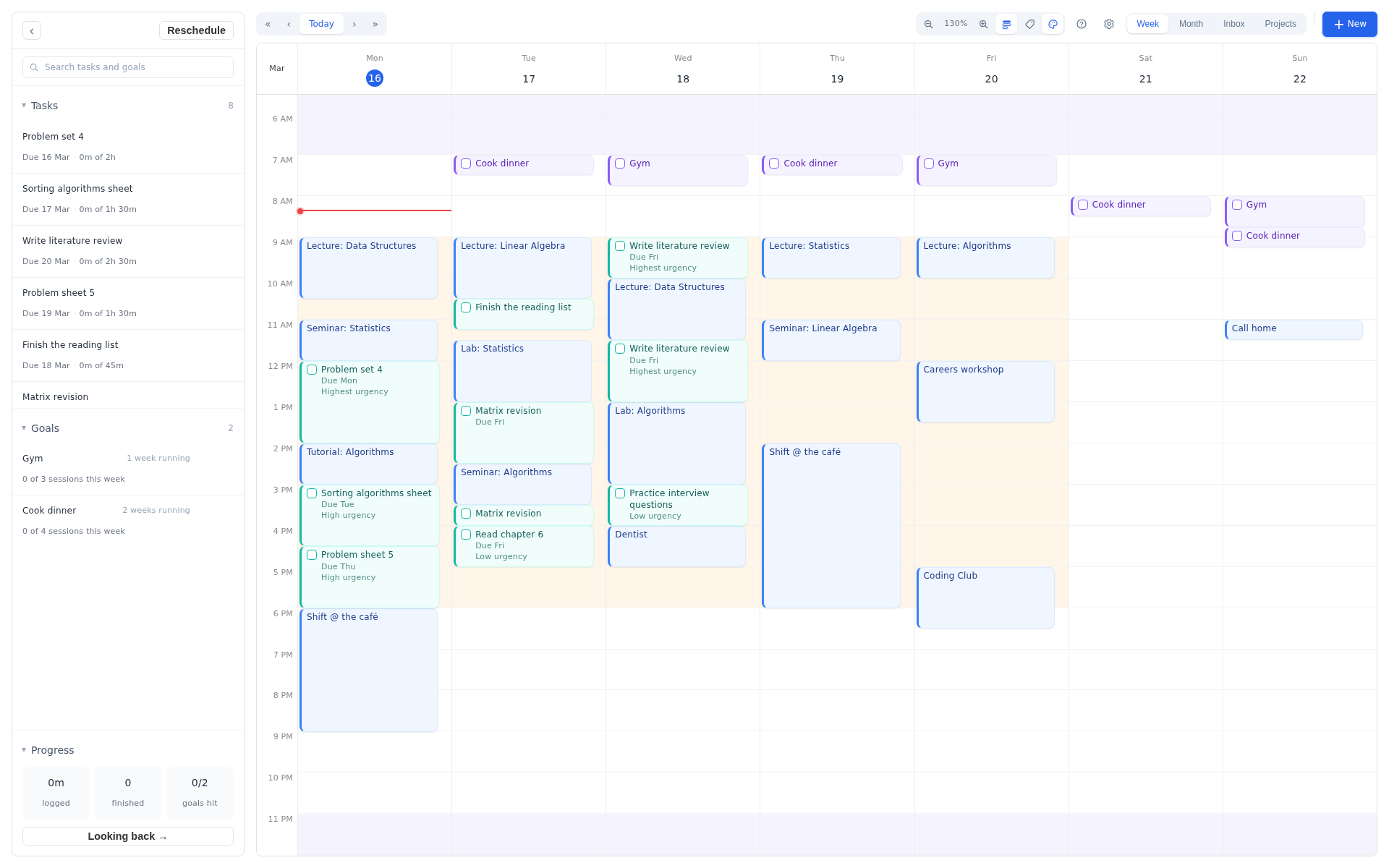
- Hours you define yourself. Name the stretches of your week — lectures, work shifts, evenings, sleep — and control which work is allowed into which. No assumption that you keep office hours.
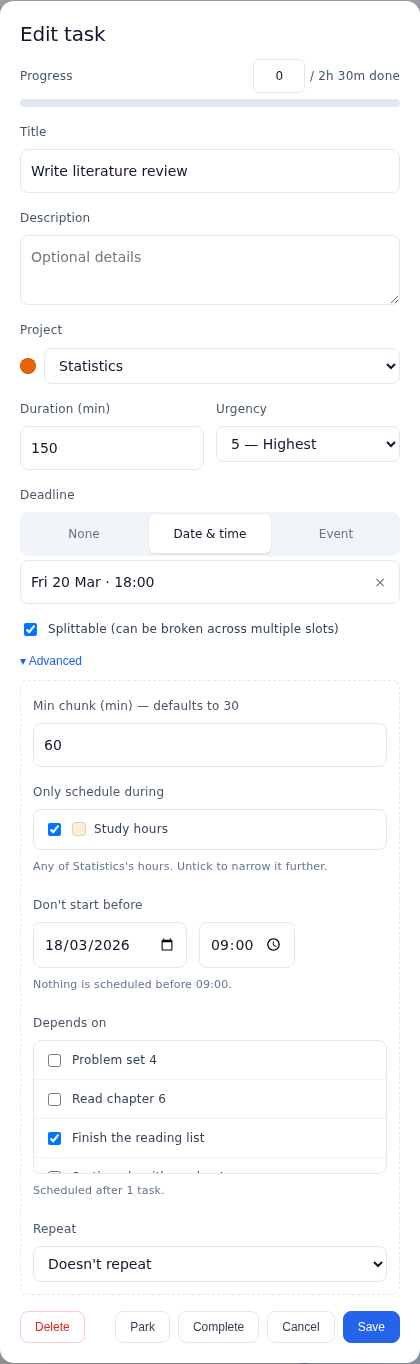
- Real control over each task. Urgency, deadlines pinned to a date or to an event, splittable tasks with a minimum chunk size so revision gets proper sittings rather than fifteen-minute scraps, earliest start dates, dependencies (read the paper before you write about it) and repeats.
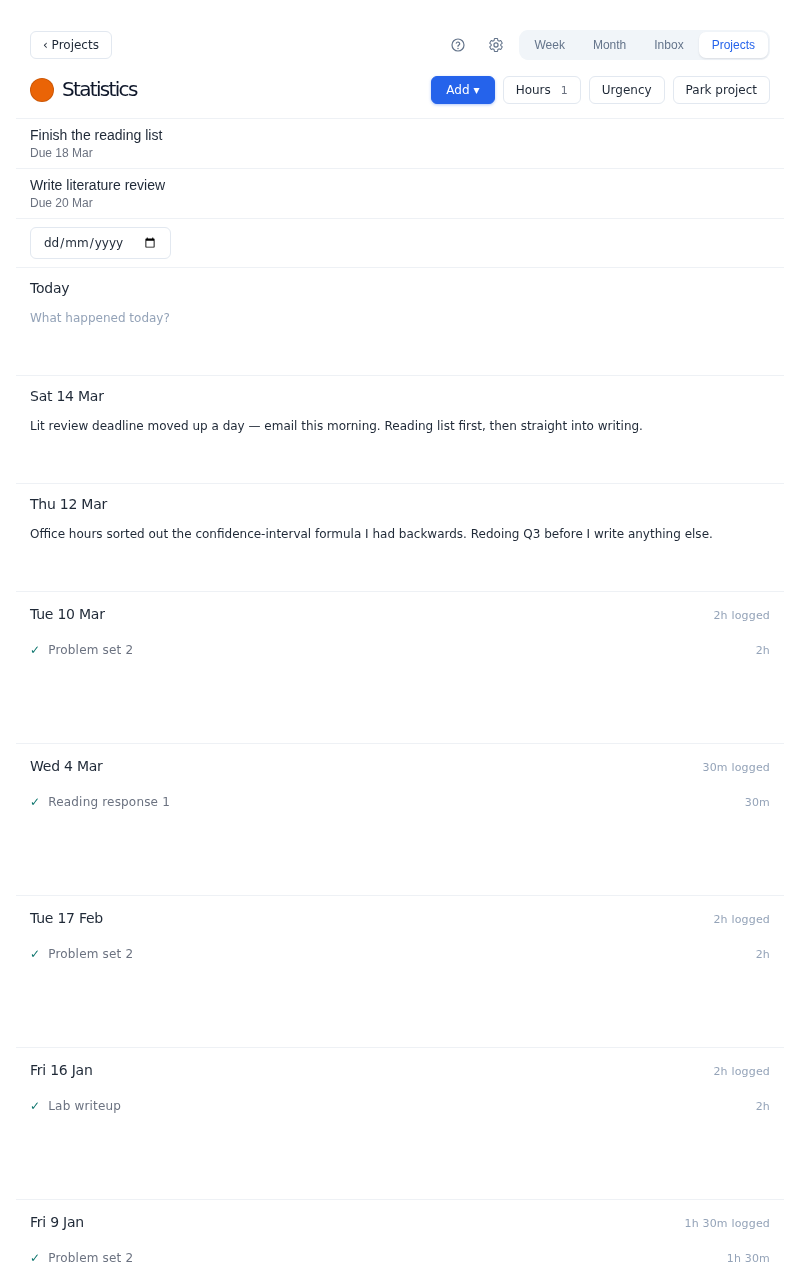
- Project workspaces. One per module or per assignment, each with its own notes, its deadlines, what's been done, what's coming, a colour and its own allowed hours. So a module's notes sit beside its work rather than in a separate app, and Increment guesses which project new work belongs to as you type it.
- Review. Where the time actually went, with streaks and a heatmap. It turns a to-do list into a done list, which during exam term is the difference between feeling behind and seeing evidence that you're not.
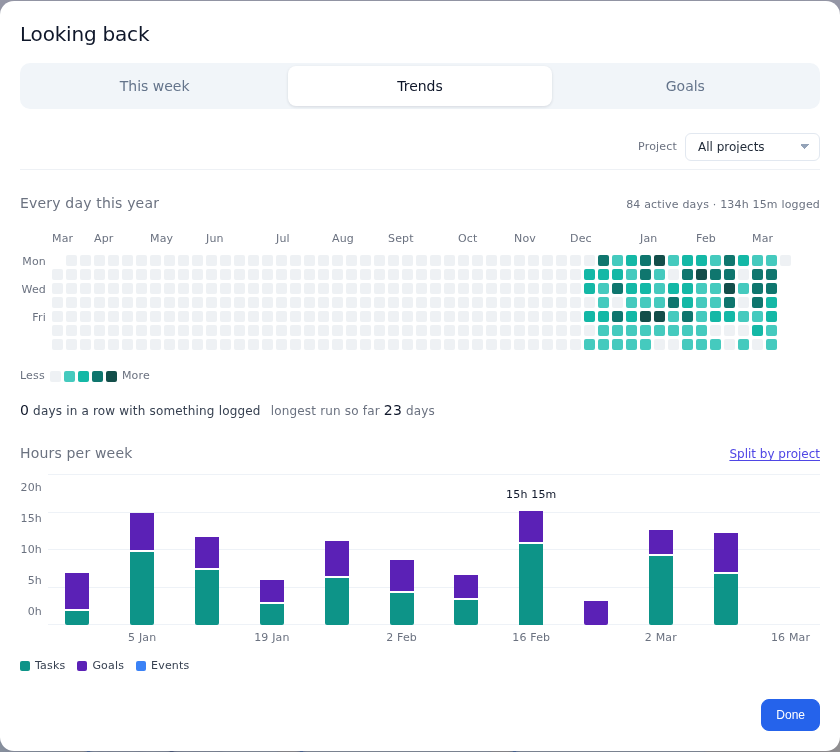
The thing I didn't expect when I was using an early version of this myself was the effect on stress. Seeing a plan laid out that genuinely gets you to Friday is calming in a way that a list of twenty-three outstanding items is not. The message changes from "look how much there is" to "right, it fits."
Increment is £6 a month, £48 a year, or £120 once for lifetime access — every feature on every plan, with a 14-day free trial. Students get 30% off the annual and lifetime plans, which brings those to £33.60 a year or £84 once. Email [email protected] from your university address to claim it.
At the student rate the lifetime option costs £84, which works out at £28 a year across a three-year degree — less than paying annually over the same period, and it doesn't quietly keep charging you after graduation. There's a full interactive demo with no signup and no card if you want to see the model before deciding anything.
Google Calendar
Free. The baseline everyone should have.
Put your timetable in it, colour-code by module, and share with a study group. It's free, it's on every device, and most universities already run on Google or Microsoft accounts. Gemini can now create and edit events for you in plain English on Workspace accounts.
Its limit is that it's a record, not a planner. It holds what you've decided; it won't decide anything for you, and it has no concept of a task that needs four hours somewhere before Thursday. Every tool below either builds on it or plugs the gap.
My Study Life
Free, with a paid tier. Best for rotating timetables.
The one genuinely student-specific planner here. It handles Week A / Week B rotating timetables, which Google Calendar cannot do natively, plus classes with room numbers, assignment reminders and exam periods. The paid tier adds subtasks, grade tracking and a feature that reads your timetable from a photo.
Worth knowing: the free tier now caps active tasks, and the recent redesign drew mixed reviews from long-time users. If your institution runs a rotating timetable it's still the easiest way to get it into a phone.
Motion
$19+ per month. Powerful, and priced for companies.
Motion does automatic scheduling well, and if a graduate employer is paying it's a reasonable tool. As a student purchase it's hard to defend: there's no free plan, the trial is seven days and asks for a card, and it's built around a working day of meetings rather than a timetable of lectures and shifts.
Tracking deadlines and tasks
Notion
Free for students. The most popular student system, for good reason.
Notion's real strength for students is databases: an assignments table with module, due date, weighting and status, filtered to show what's next. Add notes per module in the same workspace and you have one place for everything.
Students and educators at accredited institutions get the Plus plan free — claim it in Settings with your university email, and you get unlimited file uploads and 30-day history on a one-member workspace, well beyond the ordinary free tier's 5 MB upload cap. Two honest caveats: full Notion AI now sits on the Business plan rather than Plus, so free student access covers the workspace and not the AI; and Notion rewards people who enjoy building systems. If you find yourself redesigning your dashboard the night before a deadline, that's the tool talking.
Todoist
Free tier, or $5/month. The fastest way to get something out of your head.
Type "hand in stats problem set every Monday at 9am" and it parses that into a recurring task. For pure capture speed nothing beats it, and it syncs everywhere.
The free tier caps you at five active projects with a week of history and no custom reminders, which is tight if you run one project per module. Pro is $5 a month billed annually — up from $4 after a December 2025 price rise — and there's no standing public student discount, though education pricing has been offered by application. Worth remembering that it's a list, not a plan: it will happily tell you that twenty-six things are due this week without any view on when you'd do them.
Taking and organising notes
Microsoft OneNote
Free. The most underrated tool on this list.
Notebooks, sections and pages that behave like a ring binder, on every platform, free, with 5 GB of OneDrive storage. It takes handwriting on any touchscreen and records audio synced to your typed notes, so you can tap a word and hear what the lecturer was saying at that moment. Most students with a university email can also get Microsoft 365 free for a year, which raises storage to 1 TB.
Obsidian
Free app; Sync $4/month with a 40% student discount.
Notes as plain Markdown files on your own machine, linked together, with a large plugin ecosystem. For a dissertation or a multi-year research habit it's the strongest option here, and nothing is locked in a vendor's cloud.
It asks more of you than the alternatives. Expect to make decisions about folders, plugins and templates before it's useful, and note that syncing between laptop and phone means either paying for Sync or configuring iCloud yourself. If you're two weeks from finals, this is not the term to adopt it.
Research, reading and citations
Zotero
Free and open source. Non-negotiable if you write essays with citations.
One click in the browser saves a paper with its full metadata. The Word, LibreOffice and Google Docs plugins handle in-text citations, and it generates bibliographies in thousands of styles. Free storage is 300 MB, which fills up fast with PDFs, and paid storage starts at $20 a year — but check first, because many universities provide institutional storage at no cost.
The hours this saves in a final year are not a marginal gain. Set it up in first year.
Anki and Knowt
Anki free on desktop and Android, $24.99 one-off on iOS. Knowt free.
Strictly these are revision tools rather than organisation tools, but they belong in any honest list because they're where the evidence is strongest. Dunlosky and colleagues rated rereading and highlighting as low-utility study techniques, while practice testing and spaced practice were among the only ones rated high utility — which is precisely what a flashcard scheduler automates.
Anki remains the standard, especially in medicine, where shared decks cover entire curricula. Knowt is the strongest free alternative to Quizlet, offering learn modes, practice tests and spaced repetition that Quizlet now restricts, and it imports existing Quizlet sets.
Actually focusing
Forest
Free on Android, $3.99 one-off on iOS.
Start a timer and a tree grows; leave the app and it dies. It's gentle enforcement built on guilt rather than hard blocking, which for a lot of people is enough. Cheap, pleasant, and the statistics are genuinely motivating.
Cold Turkey and Freedom
Cold Turkey Pro $39 one-off; Freedom $39.99/year.
For when gentle enforcement isn't enough. Cold Turkey blocks at the operating-system level on Windows and Mac and genuinely cannot be talked round; its free version allows cancellation, which rather defeats the point. Freedom is weaker per-device but blocks laptop and phone in the same session, which matters, because distraction simply migrates to whichever device you left unlocked.
Every tool compared
Prices checked against vendors' own pages in September 2026. Student deals change; confirm before paying for anything.
| Tool | Job | Free option | Paid | Student deal |
|---|---|---|---|---|
| Increment | Planning time, deadlines, notes | Full demo, no signup + 14-day trial, no card | £6/mo, £48/yr or £120 once | 30% off annual and lifetime — £33.60/yr or £84 once |
| Google Calendar | Timetable | Free | — | Free |
| My Study Life | Rotating timetables | Free (task cap) | MyStudyLife+ | Built for students |
| Motion | Planning time | None — 7-day trial, card required | $19+/mo | None |
| Notion | Deadlines + notes | Free (5 MB uploads) | $10/mo Plus | Plus free with university email |
| Todoist | Task capture | Free (5 projects) | $5/mo annual | By application only |
| OneNote | Notes | Free, 5 GB | — | M365 often free for a year |
| Obsidian | Notes / knowledge base | App free | Sync $4/mo | 40% off Sync |
| Zotero | Citations | Free, 300 MB | Storage from $20/yr | Often free storage via university |
| Anki | Revision | Free desktop + Android | $24.99 iOS, one-off | Free |
| Knowt | Revision | Free | — | Free |
| Forest | Focus | Free on Android | $3.99 iOS, one-off | — |
| Cold Turkey | Focus | Free (cancellable) | $39 one-off | Discount on Writer |
| Freedom | Focus | Limited free tier | $39.99/yr | — |
Building a stack that survives the semester
The most common mistake isn't picking the wrong app. It's picking eleven of them in freshers' week and abandoning all of them by November. Switching tools mid-term costs more than any feature gains you, because a half-migrated system is worse than a mediocre one you trust.
Three or four tools is the right number — one per job, and skip the jobs you don't have:
- Minimum viable stack, free: Google Calendar for your timetable, OneNote or Notion for notes, Zotero for citations.
- If you'd rather not run three apps: Increment covers deadlines, per-module notes and scheduling in one place, leaving Zotero as the only thing you still need for citations.
- If you're drowning in deadlines: add Increment on top, so the work has actual hours attached rather than just due dates.
- If exams are the problem: add Anki or Knowt and start in week three, not in the last fortnight.
- If your phone is the problem: add Forest, or Cold Turkey if you need to be genuinely unable to negotiate with yourself.
Then leave it alone until the holidays. Reorganising your system is the most satisfying form of procrastination ever invented, and the one nobody counts.
Where Increment isn't the answer
Three cases where something else on this list serves you better.
Your timetable rotates on a Week A / Week B pattern
My Study Life handles rotating timetables natively. Increment will take your timetable via Google, Outlook or an .ics import, but a rotating pattern is easier to set up there.
Your notes are scans, slides and images
Increment's project workspaces hold written notes perfectly well, so if your notes are text you may not need a second app at all. What it isn't built for is a library of attachments — photographed whiteboards, annotated lecture slides, marked-up PDFs, handwriting. If that's the bulk of your material, keep OneNote or Notion for it and let Increment handle the time and the deadlines.
Your workload genuinely fits in your head
If you're doing one module at a time or your deadlines are comfortably spaced, a calendar and a list are enough. Auto-scheduling earns its place when a change on Monday invalidates the rest of the week — not before.
Frequently asked questions
What are the best free organisation tools for students?
Google Calendar for your timetable, OneNote for notes, Zotero for references and Anki or Knowt for revision are all completely free. Notion gives verified students its Plus plan free with a university email address. Those five cover planning, notes, research and revision without spending anything.
How many organisation apps should a student use?
Three or four — one per job, at most. Beyond that the overhead of keeping them in sync costs more time than the tools save, and every extra app is another thing to abandon in week six. Commit for a full semester before changing anything.
Is Notion or Todoist better for students?
Notion, for most people, and mainly on price: students get Plus free, and its databases handle assignment tracking with due dates and weightings better than a flat list. Todoist is faster for capturing tasks and better at recurring ones, but the free tier's five-project cap is restrictive if you run a project per module. Neither decides when you'll do the work.
What's the best app for planning study time rather than just listing tasks?
This is the gap in most student stacks. A calendar records what you've decided and a to-do list records what's outstanding; neither works out whether it all fits. Auto-scheduling tools place your tasks into the free time around your timetable and re-plan when something changes. Increment does this from £33.60 a year on the student rate, or £84 once for lifetime access, with a free demo you can try first; Motion does it at $19+ a month with no student discount and is built for workplaces rather than degrees.
Do students get discounts on organisation apps?
Often, but unevenly. Notion gives verified students Plus free. Obsidian discounts Sync by 40%. Microsoft 365 is frequently free through a university for a year. Increment takes 30% off its annual and lifetime plans for students, making them £33.60 a year or £84 once. Todoist has no standing public student discount, and Motion has none at all. Always check with your institutional email before paying full price — and check whether your university already licenses something.
How do I stop feeling overwhelmed by my workload?
Two things help more than any app. First, break large pieces of work into sittings with real durations, because "write essay" is unschedulable and "essay: draft section two, 90 minutes" isn't. Second, get those sittings onto actual days, so you can see whether the plan reaches your deadlines. Most of the panic comes from not knowing whether the work fits — and that's answerable. If it doesn't fit, you've learned that early enough to ask for an extension rather than discovering it at 3am.
Start with the week you're actually having
If the part you find hardest is knowing what's due, most of this list is free and you should start there. If the part you find hardest is knowing when any of it will get done, that's the problem Increment was built for — as a student, for exactly that. It's 30% off for students, and the demo below needs no card.
Sources
- Notion pricing and its education plan terms.
- Todoist pricing — free tier limits and the December 2025 increase.
- Obsidian pricing — Sync, Publish and the education discount.
- Motion pricing.
- Mindomax, "Best Study Apps for Students" — pricing checks for Anki, Zotero, Forest, Cold Turkey, Freedom, Knowt and My Study Life.
- Solving Procrastination — summary of prevalence estimates across studies.
- Fentaw et al. (2022), Education Research International — procrastination and its links to planning and stress.
- Dunlosky et al. (2013) — utility ratings for common study techniques.