The Best AI Calendar in 2026: An Honest Comparison
Searching for the best AI calendar returns a hundred results and no answer, and there's a good reason for that. The phrase covers at least three unrelated kinds of product. One writes your events for you. One defends your focus time from other people's meetings. And one actually decides when your work happens. They all get sold as "AI calendars," most of them cost $15–34 a month, and picking the wrong category is the most common way people waste a subscription.
This guide sorts the category out and compares every serious tool on real 2026 prices. We make one of them, so we've put Increment first and told you plainly what it does and doesn't do — the prices and limitations quoted for everyone else come from their own pricing pages, checked this week, and you can follow the links to verify any of them.
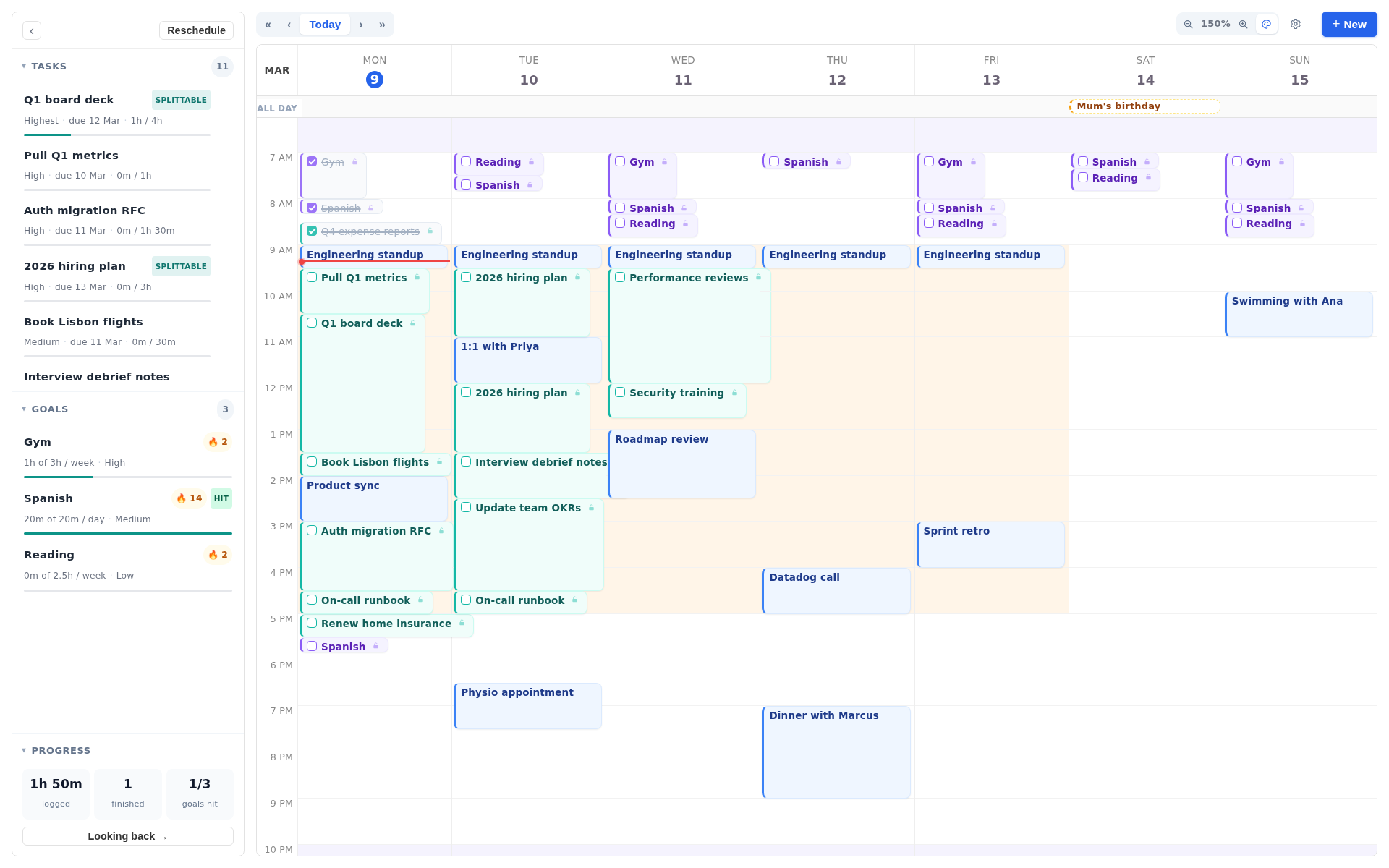
Three things people mean by "AI calendar"
Before comparing anything, work out which of these you're actually shopping for. Most disappointment in this category comes from buying one and needing another.
Natural-language layers on the calendar you already have
Gemini in Google Calendar, Copilot in Outlook, Fantastical, Notion Calendar, Vimcal. You type or say something in plain English and an event appears. The calendar is the same calendar; the AI is a faster way to put things in it.
These are genuinely useful and mostly already paid for. They're also more limited than the marketing suggests. Gemini in Calendar creates and edits events when you ask, in a session — it can't watch for a reason to schedule something and act on it while you're away, it works on Google Calendar rather than reaching across to Outlook, and it doesn't handle the multi-step coordination part. Adding events faster is a real win. It isn't planning.
Meeting defenders and focus-time protectors
Reclaim is the main one. These sit on top of a work calendar and fight the meeting load: creating focus blocks, moving flexible internal meetings together, holding lunch and travel time, offering booking links so people stop emailing you about availability.
This is a team problem more than a personal one. If your week is ruined by other people's invitations, this is your category. If your week is ruined by your own to-do list, it isn't.
Auto-schedulers that plan your actual work
Increment, Motion, FlowSavvy, Morgen, and — in a manual, deliberately un-automated way — Sunsama and Akiflow. You give the tool your tasks with deadlines and rough durations, and it places them into the gaps around your fixed commitments. When the week changes, the plan changes.
This is the category most people mean when they search for an AI calendar, and the one where the tools differ most. It's also the only category where the software is doing something you couldn't reasonably do by hand. We've written separately about why manual time blocking falls apart, which is the problem these tools exist to solve.
"Most apps sold as AI calendars just display your events more attractively. The test is whether it decides when your work happens — and whether you can overrule it."
What to check before you pay
Feature lists are close to useless here, because every product in the category lists the same nine things. These six questions actually separate them.
Does it schedule, or just suggest?
There's a real split between tools that place work on your calendar automatically and tools that draft a plan for you to approve. Neither is wrong. Automatic saves more time; approval-based feels less like being managed by software. Know which one you're buying.
Can you overrule it?
The most common complaint about aggressive auto-schedulers is the feeling that the calendar belongs to the algorithm. Check that you can pin a block in place, drag something and have it stay dragged, and stop a task being moved. A scheduler you can't argue with gets abandoned within a month.
How far ahead does it plan?
This is a common paywall. FlowSavvy's free tier schedules two weeks out and its Pro tier goes to eight. Reclaim's free tier has a one-week scheduling range. If you work to deadlines a month away, a two-week horizon isn't a limitation you'll discover later — it's one you'll hit immediately.
Does it handle your whole day, or just work hours?
Plenty of these tools assume a 9-to-5 and treat everything else as empty space. If you're freelance, shift-based, studying, or working across time zones, you need control over which stretches of time each kind of work is allowed to use. It's a gap we've complained about at some length.
What happens to things without deadlines?
Exercise, reading, a language, a side project. These have no due date, so in a deadline-driven scheduler they lose every fight and never get placed. This is the single biggest difference between the tools below, and the difference between a work tool and a life tool.
What's the real price?
Per-seat pricing, annual-only discounts, credit metering and add-ons make the headline number unreliable. Motion's plans include a monthly credit allowance with overage billed on top; Akiflow's meeting assistant is a separate subscription. And almost all of it is rent: you stop paying, you lose the tool. Read the second line of the pricing page.
The tools, one by one
Increment
Full auto-scheduling with fine-grained control, and the only one you can buy outright.
We built Increment because the auto-schedulers we tried were designed for a job with fixed working hours, and because they were all deadline machines. Anything without a due date — the gym, the language app, the side project — simply never got placed.
So Increment splits your week into three kinds of thing rather than the usual two. Events are fixed and never moved; everything else is planned around them. Tasks are flexible work with a duration, which the engine places wherever it fits before the deadline. Goals are hours you want to spend each week rather than things you must finish, and they fill whatever time is left over, proportionally. That third type is why the non-urgent things you care about stop losing every fight to the urgent ones — and almost nothing else in this list has an equivalent.
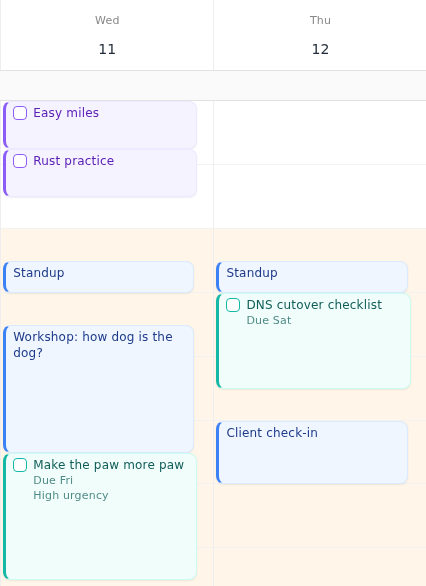
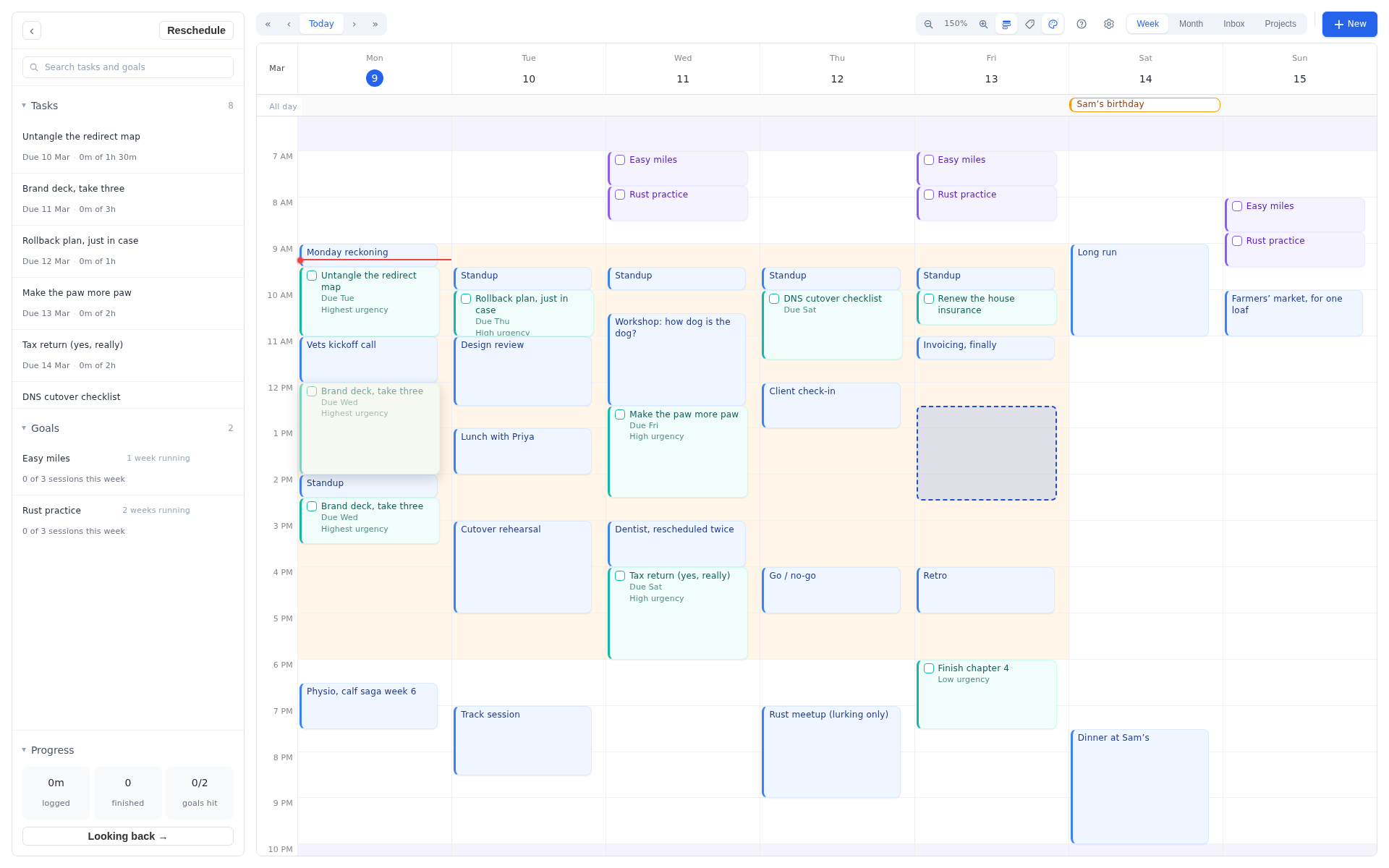
What it's actually like to use:
- Reschedule is one press. Drag an event, add three new tasks, or lose a morning to something unexpected, and the whole flexible layer re-flows around it. No dragging blocks down the week by hand.
- You can always overrule it. Drag a block, resize it, or pin it in place, and the engine schedules around whatever you've fixed. The calendar stays yours.
- Hours are yours to define. Name the stretches of your week — working, personal, sleeping, or something specific to you — and control which tasks are allowed into which. Individual tasks and whole projects can carry their own.
- Precise control where you want it. Urgency, deadlines tied to a date or to an event, splittable tasks with a minimum chunk size so deep work gets proper sittings, earliest start dates, dependencies between tasks, and repeats for the things that come round every week.
- Projects with their own workspace. Notes, what's left, what got done, custom hours, a colour so you can read your week by project, and a backlog for work that should stop being scheduled for now. Increment guesses which project new work belongs to as you type it.
- Review. Where your time actually went across events, tasks and goals, with streaks and an activity heatmap. It turns a to-do list into a done list, which is the part that keeps people using it.
- It reads your existing calendar. Connect Outlook or Microsoft 365, or subscribe to any calendar by its link — Google Calendar included — and it stays in sync on its own. An .ics export works too. Recurring events, exceptions and cancellations are all understood, and Increment only reads your calendar; it never writes back.
- Runs anywhere, syncs everywhere. Browser-based, so Windows, Mac, Linux and phone with nothing to install, syncing across your devices and working offline.
Pricing is the part that separates it from everything below: £6 a month, £48 a year, or £120 once for lifetime access, including all future updates. Every plan includes every feature — there's no tier where the useful scheduling lives. That's the lowest price of any full-featured tool here by some distance, and the only one-off purchase in the category. Every plan starts with 14 days free and no card, and there's a full interactive demo that needs no signup and no card.
Best for: anyone with an irregular week, personal goals that keep getting squeezed out, and no appetite for paying rent on a calendar forever.
Motion
The most aggressive automation, at the highest price.
Motion is the best-known name in the category and the most fully automatic. You add tasks; it decides when you'll do them, and re-decides constantly as meetings appear. When it works, it removes daily planning entirely.
Pro AI is $19 per seat per month and Business AI is $29, both including a monthly AI credit allowance — 7,500 credits on Pro, with overage charged on top once you exhaust them. There is no free plan, only a 7-day trial that wants a card up front.
The caution is that Motion has grown well beyond scheduling. It's now positioned as an all-purpose AI work platform with chat, docs, meeting notes and "AI employees," and longtime users have been vocal about the interface getting heavier and the pricing getting harder to follow. If all you want is a scheduler, you're buying a suite and paying suite prices for it.
Best for: teams and consultants who want scheduling handled for them and won't blink at $19–29 a seat.
Reclaim
The strongest free tier, built around meetings rather than work.
Reclaim (owned by Dropbox since 2024) sits on top of Google Calendar or Outlook and optimises around meeting load: habits, focus time, buffer time, smart 1:1s, scheduling links. It syncs tasks in from Asana, Todoist, Jira, Linear, ClickUp and Google Tasks rather than replacing your task manager, so it assumes you're already paying for one of those.
Its free Lite plan is a genuine free plan rather than a trial, which is rare — but it's tightly capped, at one habit, one scheduling link and a one-week scheduling range. Starter is $10 per seat per month and Business is $15 on annual billing.
Two things to know. The pricing is per seat and designed for teams, so a solo user pays a rate built for scale. And there's no native mobile app — mobile is a progressive web app.
Best for: meeting-heavy roles inside a company, especially if you already live in a separate task manager.
Morgen
The integration hub, with AI that asks first.
Morgen's pitch is breadth: multiple calendar providers and eight-odd task tools in one window, with an AI Planner that drafts a day and hands it to you to approve rather than committing anything itself. It runs natively on macOS, Windows, Linux, iOS, Android and the web, which no one else here can say.
Pricing is $30 a month, or $15 a month billed annually. Morgen discontinued its free plan in March 2026; there's a 14-day trial instead. If you like approving a plan every morning it's a good fit — if you'd rather the plan simply be right and get on with your day, it's a daily chore you're paying for.
Best for: people with calendars and tasks scattered across five different apps who want one surface over all of it.
Sunsama and Akiflow
Premium planning, not much AI.
Both get filed under "AI calendar" in listicles, and neither really belongs there. Sunsama is a guided daily planning ritual: you pull tasks in, estimate them, and it warns you when the day is overcommitted. Akiflow is a keyboard-driven command centre that pulls tasks from everywhere into one inbox for fast manual scheduling. In both cases you are still the scheduler.
They're also the most expensive options here. Sunsama raised its price in 2026 for the first time in about five years, to $25 a month or $20 billed annually, with a 14-day trial and no free plan. Akiflow is $34 a month or $19 billed annually, with a two-year "Believer" plan at $14.90 a month and a meeting assistant add-on that costs another $19 on top.
Best for: people who want structure and deliberateness, and specifically don't want an algorithm placing their work.
FlowSavvy
Deadline-driven auto-scheduling with a usable free tier.
FlowSavvy does one job: throw in a to-do list with due dates and durations, and it time-blocks your calendar, splitting tasks around events, balancing workload across days and flagging what's going to miss a deadline.
The free plan is real and usable — unlimited auto-rescheduling, two-way sync with Google, Outlook and iCloud — but capped at a two-week scheduling horizon, one set of scheduling hours, three repeating auto-scheduled tasks and five task lists. Pro is $14 a month, or $10 billed annually, and lifts those limits to an eight-week horizon with unlimited scheduling-hour profiles, priority levels and task dependencies. Note what's on the paid side of that line: multiple sets of hours and priorities are the things you need on any complicated week.
Best for: people who want deadline scheduling and nothing else, and want to test it for free first.
Google Calendar with Gemini
Free, and probably already enough if your problem is only events.
If you just need to enter and find events, start here before paying anyone. Gemini can read across your calendars, create and edit events on the ones you have permission for, and suggest meeting times using colleagues' availability inside your Workspace.
The ceiling arrives fast. It won't invite people to events or edit an existing event's location or description. It doesn't cross into Outlook. It works when prompted and does nothing between prompts. And it won't decide when your tasks happen — that isn't what it's for. Carly has a detailed breakdown of where the limits sit.
Best for: anyone whose calendar is mostly meetings and who hasn't yet checked what they already have.
Prices at a glance
Checked against vendors' own pricing pages on 4 September 2026. Annual rates shown where they're materially lower.
| Tool | Free option | Paid | What it's really for |
|---|---|---|---|
| Increment | Full demo, no signup, plus 14-day trial, no card | £4 / mo billed yearly, £6 monthly, or £120 once | Fitting work and personal goals around a real, messy week |
| Motion | None — 7-day trial, card required | $19–29 / seat / mo, plus credit overage | Fully automatic scheduling inside a wider work suite |
| Reclaim | Free Lite tier (1 habit, 1-week range) | $10–15 / seat / mo annually | Defending focus time against meetings |
| Morgen | None since March 2026 — 14-day trial | $15 / mo annually, $30 monthly | Unifying many calendars and task tools |
| Sunsama | None — 14-day trial | $20 / mo annually, $25 monthly | A guided manual planning ritual |
| Akiflow | None — 7-day trial | $19 / mo annually, $34 monthly | Fast keyboard-driven task capture and scheduling |
| FlowSavvy | Free tier, 2-week horizon | $10 / mo annually, $14 monthly | Straightforward deadline-driven auto-scheduling |
| Google + Gemini | Included with Workspace / AI plans | — | Faster event entry on the calendar you have |
The row that changes over time is the first one. Every other paid tool here is a subscription, so the number in that column repeats every month for as long as you use it: Motion's cheapest plan is $228 a year, Sunsama $240, Morgen and Akiflow $180 and $228. Increment's lifetime option is £120, once — and then nothing, including for every update after it. Three years of those four is $540 to $720; three years of Increment on the lifetime licence is still £120.
Where Increment isn't the answer
Three cases where you should buy something else, so you don't waste a trial finding out.
You need team scheduling
Increment plans one person's week. If you need shared workloads, capacity planning across a team, or booking links for clients, Motion and Reclaim are built for that and we aren't.
Your tasks must stay in Jira, Asana or Linear
Increment syncs Outlook calendars and imports .ics files from anything else, but it doesn't pull tasks from project management tools. Reclaim and Morgen do.
Your problem is meetings, not work
If your week is being destroyed by other people's invitations rather than your own workload, a focus-time defender like Reclaim will help you more than a task scheduler will.
So which is the best AI calendar?
There's no single winner for everyone, but there is a best one per problem:
- Fitting real work and personal goals around an irregular week, with fine control and no permanent subscription: Increment, £48 a year or £120 once.
- Handing your entire workday to an algorithm, with a team around you: Motion, if $19–29 a seat is acceptable.
- Protecting focus time from meetings: Reclaim, starting free.
- One window over many calendars and task tools: Morgen.
- Planning deliberately, by hand, with structure: Sunsama or Akiflow.
- Deadline scheduling on a tight budget: FlowSavvy's free tier, within its two-week horizon.
- Adding and finding events faster: what you already have — Gemini in Google Calendar or Copilot in Outlook, at no extra cost.
Whichever way you go, test it on a genuinely bad week rather than a tidy one. Every scheduler looks brilliant on an empty Tuesday. What matters is what it does on the Thursday when a meeting overruns, two things slip, and something new lands that has to be done by Friday.
Common questions
Which AI calendar is cheapest?
Reclaim's Lite plan and FlowSavvy's free tier cost nothing, though both are capped hard — a one-week scheduling range on Reclaim, a two-week horizon on FlowSavvy. Of the full-featured tools, Increment is the cheapest at £48 a year — about £4 a month — and the only one with a one-off price: £120 for lifetime access rather than $180–$408 every year.
Is there a genuinely free AI calendar?
Reclaim and FlowSavvy have real free plans rather than trials. Motion, Morgen, Sunsama and Akiflow are trial-only. Increment has a 14-day trial and a full demo you can use without signing up, which is the fastest way to see whether auto-scheduling suits you at all.
Can ChatGPT or Gemini just do this?
They can create and edit events when you ask. They don't run continuously, don't hold a model of your workload, and won't rebuild a week's plan when something moves. Chat assistants schedule on request; auto-schedulers schedule as a standing behaviour.
Do these tools replace my calendar?
Mostly not. Nearly all of them sync with Google, Outlook or iCloud and write blocks back to it, so colleagues still see your availability. Increment connects to Outlook and imports .ics files from anything else, Google included; direct Google sync is in limited beta while it goes through Google's review.
Is auto-scheduling worth it if I only have a few tasks?
The value scales with the mess. If you can hold your week in your head, a list is fine. It's when a change on Monday invalidates the next four days that having software re-plan it starts to pay for itself.
Try it on your own bad week
The three-type model — fixed events, flexible tasks, and goals that fill what's left — either clicks for you in about ninety seconds or it doesn't. You don't need to hand over a card to find out.
Sources
- Motion pricing — plan rates and AI credit allowances.
- FlowSavvy pricing — free vs Pro feature comparison and scheduling horizons.
- Reclaim pricing — Lite, Starter and Business tiers.
- Sunsama pricing — current rates and the annual discount.
- Morgen, "9 Best AI Calendar Apps" — platform support and the draft-then-approve model.
- Morgen on Sunsama's 2026 price change and on Akiflow's plans and add-ons.
- Carly — the practical limits of Gemini in Google Calendar.
Prices were checked against vendors' published pricing pages on 4 September 2026 and change often. Confirm before you buy.